Start free

Desk365 pricing explained

By , founder of Rinhelp · Facts checked

The short answer

Desk365 charges for each agent who works tickets, while the people raising them are free and unlimited. 5 people on Plus whose AI agent sends 1,000 replies pay up to $360 a month, more than two thirds of it in credit packs, since the AI agent needs Plus or Premium and runs on credits. A seat is $12, $22 or $32 a month on Standard, Plus or Premium when you pay for the year, or $16, $28 and $39 month to month. For those 5 people, Rinhelp is a flat $49 a month that covers 5,000 AI replies.

See Rinhelp on your own site. Enter your website and Rin builds your help desk from it: a chat widget, a help center and an inbox.

Free. No sign-up to look. Ready in a minute or two.

Is your help center somewhere else?

Rin will read . If your help articles or docs live at another address, like help. or a Notion page, Rin can read those too.

Where is your help center?

Rin reads it along with and turns it into your help center.

Desk365 pricing at a glance

Cheapest plan with AI
Plus
How it bills
Per agent, plus AI agent credits
Free plan
Yes: 50 tickets a month, with a 21-day trial and no card
AI answers cost
AI agent credits at $50 per 1,000, up to 5 a message, so at most $0.25 an AI reply

Desk365 plans

Standard

Billed yearly
$12 an agent a month
Billed monthly
$16 an agent a month
  • Tickets from email, Microsoft Teams, a support portal, a web form and a web widget
  • Workflow automation, SLA reminders and escalations
  • Canned responses
  • Custom ticket fields, forms, statuses, roles and domain
  • Knowledge base and self-service portal
  • Productivity, trend, agent performance and custom reports
  • MFA and custom password policies

Watch out for

  • Drafting, rephrasing and translating replies with AI, ticket summaries and the AI agent all start on Plus.
  • The API is held to 100 calls an hour, where Plus and Premium get 50 a minute.
  • CSAT surveys, round robin assignment, time-based automations and Microsoft Entra ID sync are missing, and you get only 1 set of business hours.

Plus

Billed yearly
$22 an agent a month
Billed monthly
$28 an agent a month
  • Everything in Standard
  • Change and approval management
  • Round robin and load-based ticket assignment
  • Time-based automations and ticket closure rules
  • CSAT surveys, ticket watchers and Microsoft Entra ID sync
  • AI Copilot to draft replies, summarize tickets and write KB articles
  • AI agent add-on with 100 free credits a month

Watch out for

  • The 100 free AI credits are recharged each month, and at up to 5 credits a message they can run out after 20 AI replies.
  • Asset management, Intune sync, audit logs and encrypted fields for PII or PHI all wait for Premium.

Premium

Billed yearly
$32 an agent a month
Billed monthly
$39 an agent a month
  • Everything in Plus
  • Scheduled ticket creation and audit logs
  • Asset management with Microsoft Intune sync
  • Software management, product inventory, vendors and depreciation
  • PII and PHI encryption, data redaction and HIPAA-ready controls
  • Custom contact and company fields, departments and group management
  • AI agent add-on with 200 free credits a month

Watch out for

  • Its 200 monthly credits can cover as few as 40 AI replies before packs at $50 per 1,000 kick in.
  • A BAA for HIPAA comes only with qualifying annual contracts, so paying month to month doesn’t get you one.

Free

Billed yearly
No yearly billing, as the plan is free
Billed monthly
$0, with no end date
  • Up to 50 tickets a month
  • A limited set of features
  • Starts on its own when the 21-day trial ends without a paid plan
  • Meant for solopreneurs and personal projects

Watch out for

  • Desk365’s terms delete a free account, with all its content, once 3 months pass without a new ticket.
  • A paid account that cancels lands here, and features and data that belonged only to the paid plan are removed and can’t be restored automatically.
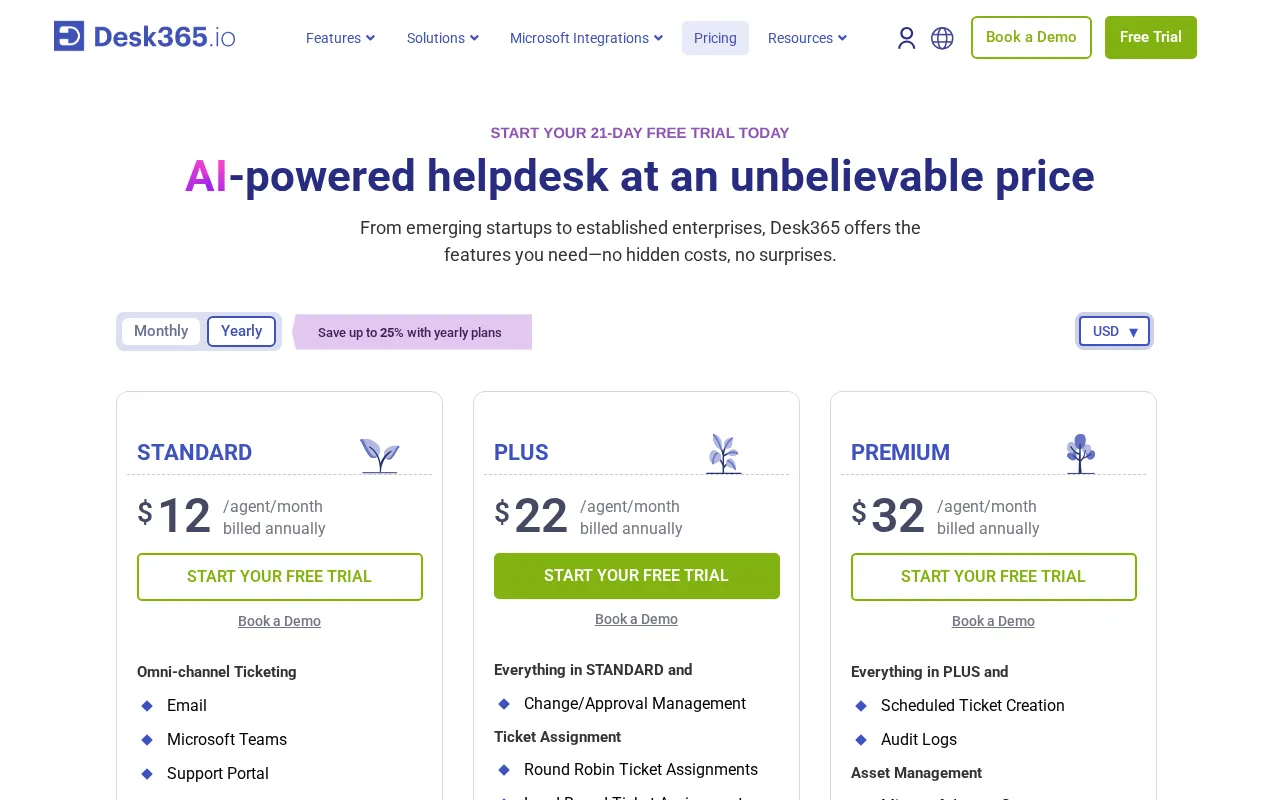
Desk365 pricing page, 11 November 2026
Desk365’s pricing page, taken

What a team of 3, 5 or 10 pays

List prices in US dollars a month, on the cheapest plan that covers each team, counting each AI reply as one resolved conversation.

TeamMonthly billHow it adds up
3 people, 300 AI replies$1663 Plus agents at $22 on annual billing, plus 2 AI agent credit packs of 1,000 at $50, for 300 AI replies at the 5 credits a message can use at most, after Plus’s 100 free credits a month. Standard, at $12, has no AI agent.
5 people, 1,000 AI replies$3605 Plus agents at $22 on annual billing, plus 5 AI agent credit packs of 1,000 at $50, for 1,000 AI replies at the 5 credits a message can use at most, after Plus’s 100 free credits a month. Standard, at $12, has no AI agent.
10 people, 3,000 AI replies$97010 Plus agents at $22 on annual billing, plus 15 AI agent credit packs of 1,000 at $50, for 3,000 AI replies at the 5 credits a message can use at most, after Plus’s 100 free credits a month. Standard, at $12, has no AI agent.

Costs beyond the headline price

  • AI agent credits are $50 per 1,000 once the monthly allowance is spent. A message can use up to 5, so an AI reply can cost as much as $0.25.
  • Free credits on Plus and Premium reset each month. Credits you buy keep going for as long as your subscription stays active.
  • Monthly billing lifts the seat price by roughly a fifth to a third: $16 instead of $12 on Standard, $28 instead of $22 on Plus, $39 instead of $32 on Premium.
  • A yearly plan is charged in advance for the full term. Desk365’s terms make those fees non-refundable, and the seat count can’t be lowered until renewal.
  • Agents added mid-term are charged at your plan’s price, prorated to the end of the term, and the change applies at once.
  • Sales tax or VAT is added to the listed prices.
  • Desk365 lists no setup fees, and moving from another help desk comes with free data migration under its “Switch at renewal guarantee”.
  • Price rises arrive by email at least 30 days before renewal and don’t touch the term you are already in.

When Desk365 is worth paying for

Desk365 earns its price for an internal IT or support team that already lives in Microsoft 365: employees open tickets from Teams, agents answer there, and Entra ID, Intune and Power Automate plug in without extra tools. Premium adds asset tracking and HIPAA-ready controls for $32 a seat on yearly billing. A team that wants AI to answer most of its queue pays more as that volume grows, because every AI reply draws on credits.

Desk365 vs Rinhelp

TeamDesk365Rinhelp
3 people, 300 AI replies$166$49: Pro for the whole workspace, using 300 of its 5,000 AI replies; Free covers your team if you don’t need AI replies.
5 people, 1,000 AI replies$360$49: Pro for the whole workspace, using 1,000 of its 5,000 AI replies.
10 people, 3,000 AI replies$970$49: Pro for the whole workspace, using 3,000 of its 5,000 AI replies.

Desk365 pricing questions

Which Desk365 plan suits a small team?

Standard covers email, Teams and portal tickets with automation and a knowledge base. Pick Plus once you want CSAT surveys, round robin assignment, AI drafting or the AI agent, and Premium only if you track assets or handle health data.

Does Desk365 cost less on yearly billing?

Yes. A yearly seat is $12, $22 or $32 against $16, $28 or $39 a month, but the whole year is charged up front and can’t be refunded. Desk365 accepts cards, ACH and wire transfers, and purchase orders for yearly plans.

How do Desk365 AI agent credits work?

Each AI agent message uses up to 5 credits. Plus includes 100 a month and Premium 200, and those reset monthly. Past them, you buy packs of 1,000 for $50 in “Plan & Billing”, and the AI agent draws on them automatically.

What happens when the Desk365 trial ends?

The 21-day trial opens every feature with no card. If you don’t pick a paid plan by the end, the account drops to the free plan, with its 50 tickets a month and a reduced feature set.

Can I downgrade or cancel Desk365 partway through a term?

You can, but nothing changes until the billing cycle ends. Fewer seats or a switch from yearly to monthly shows as a scheduled change, and a cancelled plan keeps running to the end of the term, then moves to the free plan. Upgrades and extra seats apply right away.
Sources

We checked every source below on 11 November 2026.

Try Rinhelp next to Desk365.

Start free with up to 3 teammates and 50 AI replies. Keep Desk365 running until you’re sure.

Start free