Start free

Drag pricing explained

By , founder of Rinhelp · Facts checked

The short answer

Drag charges for each user, and one plan covers the whole team: Starter, Plus or Pro, from $12 to $24 a seat each month when paid yearly. A team of 5 on Pro whose AI agents resolve 1,000 conversations pays about $520 a month, $400 of it for credits beyond the seats’ monthly pool, because Varley, Drag’s AI, spends 50 credits each time an AI agent closes a conversation by itself. Rinhelp costs that same team $49 a month, with 5,000 AI replies included.

See Rinhelp on your own site. Enter your website and Rin builds your help desk from it: a chat widget, a help center and an inbox.

Free. No sign-up to look. Ready in a minute or two.

Is your help center somewhere else?

Rin will read . If your help articles or docs live at another address, like help. or a Notion page, Rin can read those too.

Where is your help center?

Rin reads it along with and turns it into your help center.

Drag pricing at a glance

Cheapest plan with AI
Plus, or Pro for AI agents
How it bills
Per user, plus AI credits
Free plan
Not on its pricing page, 7-day trial of Pro
AI answers cost
$0.50 per AI agent resolution, after 2,000 credits a Pro seat

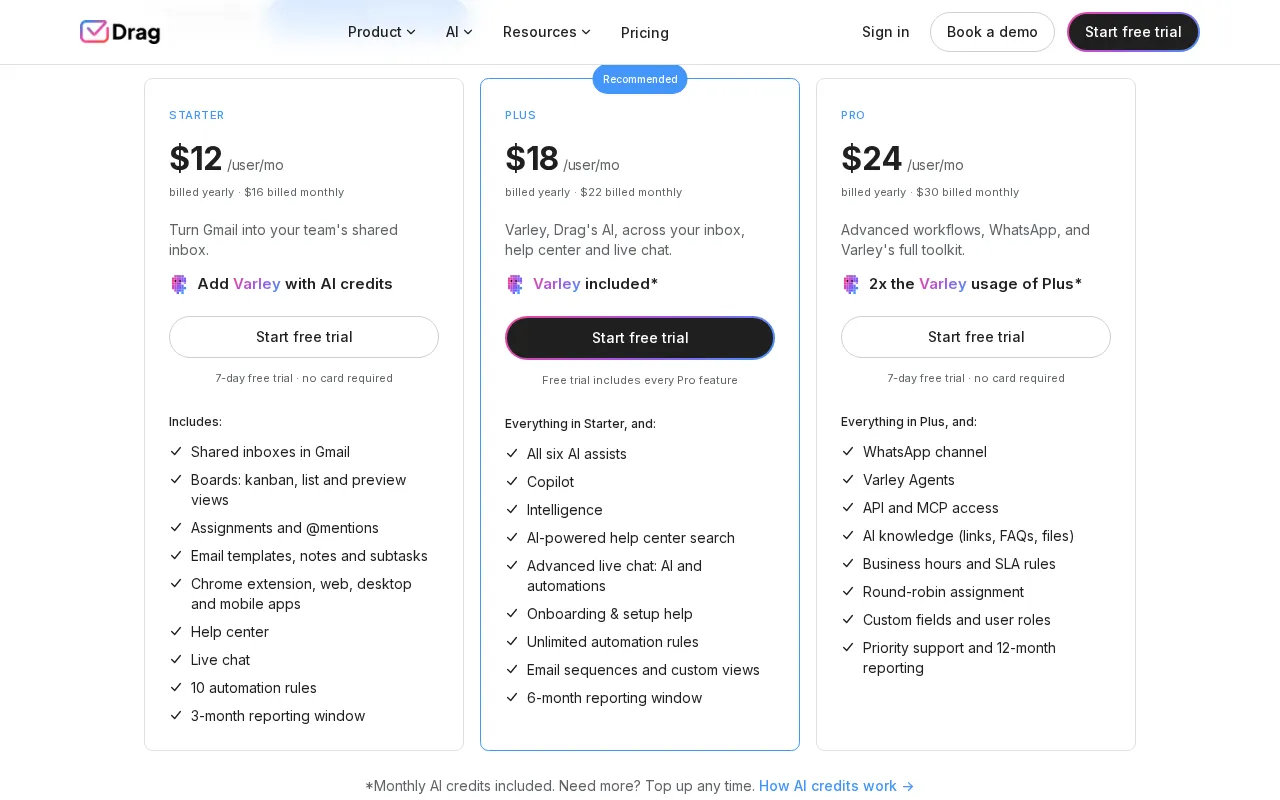
Drag plans

Starter

Billed yearly
$12 a user a month
Billed monthly
$16 a user a month
  • Shared inboxes in Gmail
  • Boards: kanban, list and preview views
  • Help center
  • Live chat
  • Varley with AI credits you buy, from $10
  • 10 automation rules
  • 3-month reporting window

Watch out for

  • No AI credits come with the seat. An admin can buy some for questions in Copilot, but Varley tagging and drafting every incoming email needs Plus or Pro.
  • Automations stop at 10 rules, and reports reach back only 3 months.
  • The help center keeps Drag’s address and its “Powered by Drag” badge: a custom domain and removing the badge both wait for Pro.
  • There is no CSV data export, and help from Drag comes by email and its knowledge base, without in-app chat or calls.

Plus

Billed yearly
$18 a user a month
Billed monthly
$22 a user a month
  • Everything in Starter
  • 1,000 AI credits a seat each month
  • All six AI assists and Copilot
  • AI-powered help center search
  • Advanced live chat: AI and automations
  • Onboarding and setup help
  • Unlimited automation rules and a 6-month reporting window

Watch out for

  • Varley drafts replies and answers searches on your help center, but AI agents that finish a conversation end to end come only with Pro.
  • WhatsApp, the API and the MCP server sit on Pro too, so connecting Claude or ChatGPT means moving every seat up.
  • The 1,000 credits per seat go into one team pool that refills on the 1st. Leftovers are lost, and once the pool is empty, drafts and new Varley questions pause until someone tops up.
  • Card templates are capped at 1 per workspace.

Pro

Billed yearly
$24 a user a month
Billed monthly
$30 a user a month
  • Everything in Plus
  • 2,000 AI credits a seat each month
  • WhatsApp channel
  • Varley AI agents
  • API and MCP access
  • Business hours and SLA rules
  • Custom fields, user roles and 12-month reporting

Watch out for

  • AI agent resolutions spend 50 credits apiece, so a seat’s 2,000 covers 40 of them. Every one after that is $0.50 from bought credits.
  • Every user on the subscription pays for Pro, even the ones who only need the shared inbox.
  • Paid month to month, the seat is $30, a quarter more than the $24 yearly price.
Drag pricing page, 11 November 2026
Drag’s pricing page, taken

What a team of 3, 5 or 10 pays

List prices in US dollars a month, on the cheapest plan that covers each team, counting each AI reply as one resolved conversation.

TeamMonthly billHow it adds up
3 people, 300 AI replies$1623 Pro users at $24 on annual billing ($72), plus 300 AI agent resolutions at 50 credits each: 6,000 credits come with the seats and 9,000 more are $90.
5 people, 1,000 AI replies$5205 Pro users at $24 ($120), plus 1,000 resolutions: 10,000 credits come with the seats and 40,000 more are $400.
10 people, 3,000 AI replies$1,54010 Pro users at $24 ($240), plus 3,000 resolutions: 20,000 credits come with the seats and 130,000 more are $1,300.

Costs beyond the headline price

  • Extra AI credits cost $0.01 each in packs from $10, with no subscription. Bought credits never expire, and Drag only draws on them once the monthly allowance is spent.
  • Auto top-up stays off until an admin turns it on, and admins can set a monthly ceiling on bought credits, so AI spend grows only as far as you let it.
  • Each AI action has its own credit price: tagging an email is 0.1 credit, a draft or thread summary 2.5, a live chat answer 5, a question to Varley 10 and an AI agent resolution 50. Hand-offs to your team, rejected suggestions and failed answers cost nothing.
  • Yearly billing trims the seat price by up to 25%: $16 becomes $12 on Starter, $22 becomes $18 on Plus and $30 becomes $24 on Pro.
  • A yearly plan is charged in advance, and Drag’s terms rule out refunds on paid plans and AI credits, apart from charges taken after you asked to cancel.
  • Drag’s terms leave sales, use and withholding taxes to you, and an overdue bill accrues interest of 0.05% a day once it is 30 days late.
  • Linking Claude, ChatGPT or another assistant through the MCP server spends none of Drag’s credits, because the assistant runs on your own subscription to it. The MCP server comes with Pro only.

When Drag is worth paying for

Drag earns its price for a team that already answers customers from Gmail and wants to see that work as cards moving across a board, with a help center and live chat on even the cheapest seat. Plus is good value when Varley mostly tags and drafts: Drag sizes a seat’s 1,000 credits for 2,000 tagged emails, 200 drafts and 30 questions a month. Non-profits, NGOs and schools can ask Drag about a dedicated discount program. The teams that overpay are those whose AI agents close hundreds of conversations a month, where the bill follows the volume, and mixed teams where a few people need Pro but everyone has to buy it.

Drag vs Rinhelp

TeamDragRinhelp
3 people, 300 AI replies$162$49: Pro for the whole workspace, using 300 of its 5,000 AI replies; Free covers your team if you don’t need AI replies.
5 people, 1,000 AI replies$520$49: Pro for the whole workspace, using 1,000 of its 5,000 AI replies.
10 people, 3,000 AI replies$1,540$49: Pro for the whole workspace, using 3,000 of its 5,000 AI replies.

Drag pricing questions

Which Drag plan suits a small support team?

Plus, for most teams that want AI help: Varley drafts and summarizes, the help center gets AI search, and automations have no cap. Choose Starter if nobody needs AI and 10 rules are enough, and Pro only when you need WhatsApp, the API or AI agents that resolve conversations alone.

Should I pay Drag monthly or yearly?

Yearly is cheaper by up to 25%, but the whole year is charged up front and unused months aren’t refunded. An admin can switch between monthly and yearly in “Billing”, so a team can start monthly and move to yearly once it trusts the tool.

What happens when a Drag team runs out of AI credits?

Email keeps syncing and sending, and AI tagging carries on even at zero. Drafts and new questions to Varley stop until an admin buys a pack or the pool refills on the 1st. Admins get alerts at 80% and 100% of the allowance.

Does the Drag trial need a card?

No. For 7 days the team gets every Pro feature, the API and MCP included, with 1,000 AI credits per seat, half of what a paid Pro seat brings. When the trial ends, Drag’s help center says the team drops to its forever-free plan.

Can I get money back if I cancel Drag?

Usually not. Cancelling stops the plan at its next renewal, and you keep using it until that date. Drag refunds only charges taken after you sent the cancellation request.

Can part of the team stay on a cheaper Drag plan?

No. A subscription carries one plan for every seat, so upgrading to Pro moves everyone and the invoice counts each seat at the Pro price. Drag’s suggestion is to remove seats nobody uses. Upgrades are prorated, and Drag shows the amount before you pay.
Sources

We checked every source below on 11 November 2026.

Try Rinhelp next to Drag.

Start free with up to 3 teammates and 50 AI replies. Keep Drag running until you’re sure.

Start free