Start free

Gleap pricing explained

By , founder of Rinhelp · Facts checked

The short answer

Gleap charges a flat monthly price per plan, with seats capped on the two cheaper ones, and bills all AI separately from a prepaid balance that Gleap prices at about $0.05 per Kai Support conversation. Five people outgrow Hobby’s single seat and Growth’s four, so on Growth with one extra seat and 1,000 Kai conversations a month the bill comes to about $170 on annual billing. Rinhelp costs that same team $49 a month, with 5,000 AI replies included.

See Rinhelp on your own site. Enter your website and Rin builds your help desk from it: a chat widget, a help center and an inbox.

Free. No sign-up to look. Ready in a minute or two.

Is your help center somewhere else?

Rin will read . If your help articles or docs live at another address, like help. or a Notion page, Rin can read those too.

Where is your help center?

Rin reads it along with and turns it into your help center.

Gleap pricing at a glance

Cheapest plan with AI
Hobby
How it bills
Per plan, plus AI from a prepaid balance
Free plan
No, 7-day trial with up to $25 of AI credit
AI answers cost
About $0.05 per Kai Support conversation, Gleap’s estimate, from a prepaid balance, and Kai stops at $1 each time it works a ticket

Gleap plans

Hobby

Billed yearly
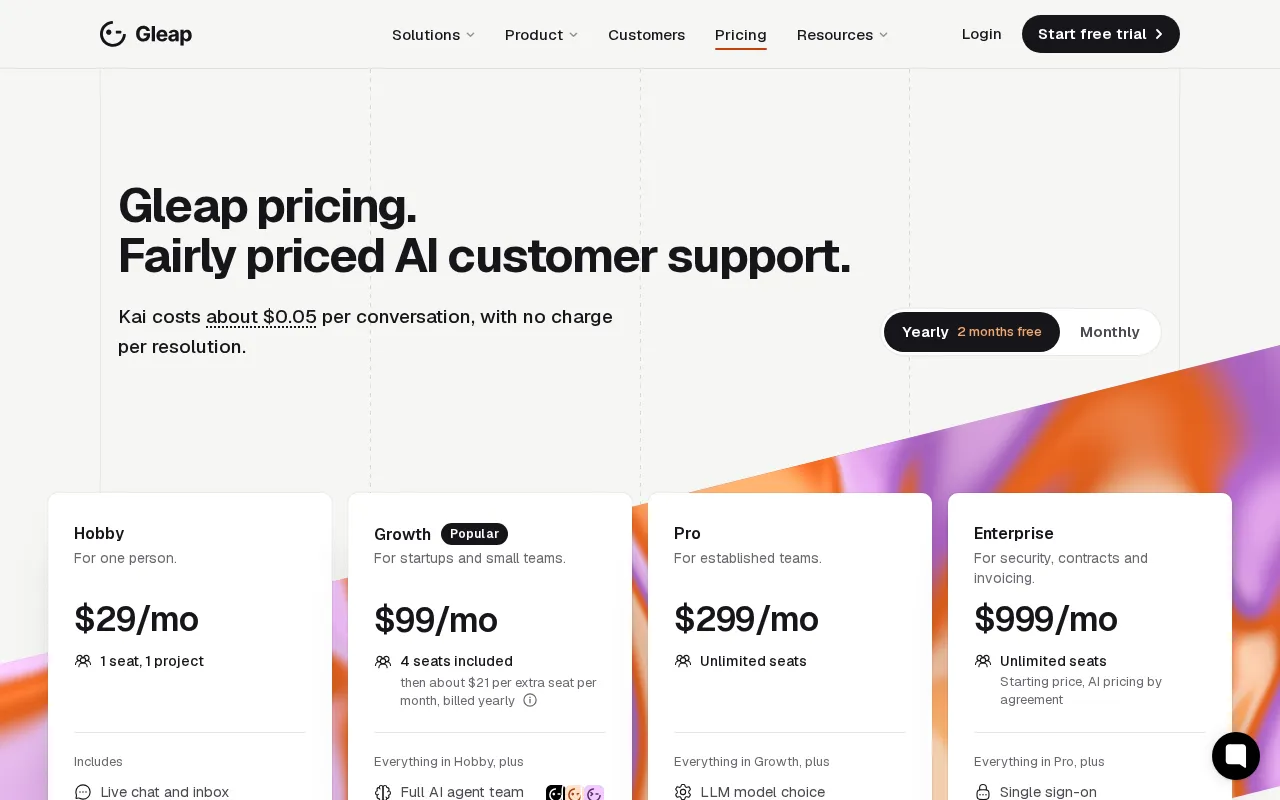
$29 a month for 1 seat and 1 project, plus AI usage
Billed monthly
$35 a month for 1 seat and 1 project, plus AI usage
  • Live chat and inbox
  • In-app bug reporting with console logs and custom data
  • Kai Support and Kai Copilot, billed by usage
  • No ticket limit, full history
  • 100 emails to customers a month
  • Powered by Gleap badge in the widget

Watch out for

  • One seat and one project, so a second teammate means moving up to Growth.
  • No help center, integrations, API, webhooks or MCP access; Shopify and Stripe both need Growth.
  • Only 100 emails to customers a month, and the widget keeps the Powered by Gleap badge.
  • Kai Support answers here, but its deeper investigations of hard tickets and Kai Code start at Growth.

Growth

Billed yearly
$99 a month with 4 seats, then $250 an extra seat a year, plus AI usage
Billed monthly
$119 a month with 4 seats, then $25 an extra seat, plus AI usage
  • Everything in Hobby
  • Every channel and integration, with the API, webhooks and MCP server
  • Help center and session replays
  • Kai Support investigations, Kai Code with 5 repositories and custom agents
  • Kai Voice at $0.075 a widget minute and $0.20 a phone minute, with numbers at $5 a month
  • Surveys and product tours
  • 1,000 emails to customers a month

Watch out for

  • Four seats are included; extra ones must be added before you invite a fifth person, at $25 a month or $250 a year each.
  • A removed seat keeps billing until the next renewal.
  • Emails to customers past 1,000 a month cost $2 per 1,000, and each phone number is $5 a month.
  • Advanced reports, SLA policies, custom roles and model choice are held back for Pro.

Pro

Billed yearly
$299 a month with unlimited seats, plus AI usage
Billed monthly
$359 a month with unlimited seats, plus AI usage
  • Everything in Growth
  • LLM model choice
  • First phone number included
  • Advanced reports
  • Custom roles and SLA policies
  • SOC 2 report and priority support

Watch out for

  • Seats are unlimited, but AI still comes out of the prepaid balance at the same rates as Growth.
  • The SOC 2 report is shared on request, and the first phone number is the only one included.

Enterprise

Billed yearly
From $999 a month with unlimited seats, AI priced by agreement
Billed monthly
From $1,199 a month with unlimited seats, AI priced by agreement
  • Everything in Pro
  • Single sign-on
  • Invoice billing
  • Bring your own model
  • Dedicated success manager
  • Custom SLA

Watch out for

  • Single sign-on and invoice billing are only on this plan, so a team that needs either can’t buy them self-serve.
  • Plan changes go through your account team rather than the billing page.
Gleap pricing page, 20 November 2026
Gleap’s pricing page, taken

What a team of 3, 5 or 10 pays

List prices in US dollars a month, on the cheapest plan that covers each team, counting each AI reply as one resolved conversation.

TeamMonthly billHow it adds up
3 people, 300 AI replies$114Growth at $99 a month on annual billing with 4 seats, plus 300 Kai Support conversations at about $0.05, Gleap’s estimate.
5 people, 1,000 AI replies$170Growth at $99 a month on annual billing with 4 seats, plus 1 extra seat at $250 a year a seat, plus 1,000 Kai Support conversations at about $0.05, Gleap’s estimate.
10 people, 3,000 AI replies$374Growth at $99 a month on annual billing with 4 seats, plus 6 extra seats at $250 a year a seat, plus 3,000 Kai Support conversations at about $0.05, Gleap’s estimate.

Costs beyond the headline price

  • AI usage: no plan includes AI. Kai Support and Kai Copilot draw on a prepaid balance at about $0.05 a conversation by Gleap’s estimate, which depends on the model and how long the conversation runs.
  • A ticket Kai investigates costs more than one it simply answers, though Kai stops at $1 each time it works a ticket, and you can set a daily cap and a monthly budget.
  • Auto-recharge tops the balance up from your payment method on file by default on paid plans; you can change the threshold or switch it off in “Billing”.
  • Translations, summaries, tagging, assignment, help-center search and website crawling are billed by usage on paid plans too.
  • Kai Voice, from Growth, costs $0.075 a minute for calls in the widget and $0.20 a minute on a phone line, plus $5 a month for each number past any included one.
  • Paying monthly costs about a fifth more than yearly: $35 against $29 on Hobby, $119 against $99 on Growth and $359 against $299 on Pro.
  • Refunds are at Gleap’s discretion, mainly for technical problems, and only if requested within 7 days of the first purchase; a cancelled plan runs to the end of its period, then the workspace turns read-only.

When Gleap is worth paying for

Gleap earns its price for a software team that wants bug reports with console logs, session replays, a feature roadmap, surveys and customer chat in one bill, and that will use Kai Code to turn confirmed bugs into pull requests. Pro is the better buy from 14 people, where Growth’s 10 extra seats cost more than the gap to Pro. A small team that answers only email and chat pays for a toolkit it leaves unopened, and still pays for each AI conversation on top.

Gleap vs Rinhelp

TeamGleapRinhelp
3 people, 300 AI replies$114$49: Pro for the whole workspace, using 300 of its 5,000 AI replies; Free covers your team if you don’t need AI replies.
5 people, 1,000 AI replies$170$49: Pro for the whole workspace, using 1,000 of its 5,000 AI replies.
10 people, 3,000 AI replies$374$49: Pro for the whole workspace, using 3,000 of its 5,000 AI replies.

Gleap pricing questions

Which Gleap plan should a small support team pick?

Growth. Hobby holds one person and has no help center or integrations, so any team of two or more ends up on Growth, which includes four seats, every channel and the MCP server.

Is Gleap cheaper paid yearly?

Yes. Yearly billing gives two months free, the only discount on the pricing page: Growth is $99 a month paid yearly against $119 month to month. Extra Growth seats follow the same interval, at $250 a year or $25 a month.

What happens when the AI balance runs out?

Kai pauses until the balance is topped up, and your team can still reply. Auto-recharge is on by default for paid workspaces, so it usually refills from your payment method first.

Do I need a card to start the Gleap trial?

No. The 7-day trial starts without a card and includes up to $25 of AI credit for Kai. After 7 days without a plan the workspace is read-only, and a plan is charged the moment you choose it.

Can I change or cancel my Gleap plan?

Yes, in “Billing”, which shows the amount and timing before you confirm. A cancelled plan stays active until the period ends; moving down to a plan without a feature switches that feature off at once, though your data and settings are kept.
Sources

We checked every source below on 20 November 2026.

Try Rinhelp next to Gleap.

Start free with up to 3 teammates and 50 AI replies. Keep Gleap running until you’re sure.

Start free