Start free

HelpCrunch pricing explained

By , founder of Rinhelp · Facts checked

The short answer

HelpCrunch bills each team member, then sells email and AI by volume on top. A team of 5 on Pro pays $276 a month on annual billing once it adds 1,000 more AI conversations and 5,000 emails. Basic is $12 and Pro $20 a team member a month when you pay for the year, or $15 and $25 month to month, while Unlimited costs $495 a month on annual billing for any number of people. Rinhelp charges those 5 people $49 a month in total, with 5,000 AI replies included.

See Rinhelp on your own site. Enter your website and Rin builds your help desk from it: a chat widget, a help center and an inbox.

Free. No sign-up to look. Ready in a minute or two.

Is your help center somewhere else?

Rin will read . If your help articles or docs live at another address, like help. or a Notion page, Rin can read those too.

Where is your help center?

Rin reads it along with and turns it into your help center.

HelpCrunch pricing at a glance

Cheapest plan with AI
Pro
How it bills
Per team member, plus email volume and AI conversations
Free plan
No, 14-day trial without a card
AI answers cost
50 AI conversations a month on Pro, then from $23.20 for 100 more on annual billing ($29 monthly)

HelpCrunch plans

Basic

Billed yearly
$12 a team member a month, paid yearly
Billed monthly
$15 a team member a month
  • 1 widget and 15 messenger channels
  • No emails until you add an email volume, from 1,000 a month
  • 20 AI Editor requests per team member
  • 3 auto messages and 3 popups
  • Monolingual knowledge base
  • Full customization and basic automation
  • Medium priority support

Watch out for

  • It sends no email at all until you add an email volume, starting at 1,000 emails a month.
  • No AI agents, chatbot flows or WhatsApp channel: all three start on Pro.
  • One widget, 3 active auto messages, 3 active popups and a knowledge base in a single language.
  • HelpCrunch branding stays on the chat widget, popups, knowledge base and emails.

Pro

Billed yearly
$20 a team member a month, paid yearly
Billed monthly
$25 a team member a month
  • Everything in Basic
  • 5 widgets, 25 messenger channels and the WhatsApp channel
  • 15 chatbot flows and 5 AI agents
  • 50 AI conversations a month and 200 AI data sources
  • 25 auto messages, 25 popups and 1 custom role
  • Multilingual knowledge base and advanced automation
  • HelpCrunch branding removal

Watch out for

  • The account gets 50 AI conversations a month, and once they are used the chatbot skips the AI step until the cycle resets or you buy an extension.
  • Email still costs extra, and the smallest volume on Pro is 5,000 emails a month.
  • AI agents learn from at most 200 data sources, an article in 3 languages counts as 3, and new articles past the limit don’t reach the AI until you buy a data source extension.
  • Only 1 custom role and 25 active auto messages and popups.

Unlimited

Billed yearly
$495 a month for unlimited team members, paid yearly
Billed monthly
$620 a month for unlimited team members
  • Everything in Pro
  • Unlimited team members and widgets
  • 50,000 emails and 100 messenger channels
  • Unlimited chatbot flows, AI agents and custom roles
  • 100 AI conversations a month and 500 AI data sources
  • Unlimited auto messages, popups and AI Editor requests
  • Highest priority support

Watch out for

  • Its 100 AI conversations a month are only twice Pro’s, so a busy team still buys extensions.
  • The 50,000 emails are fixed in the price, and a bigger volume means asking HelpCrunch in chat.
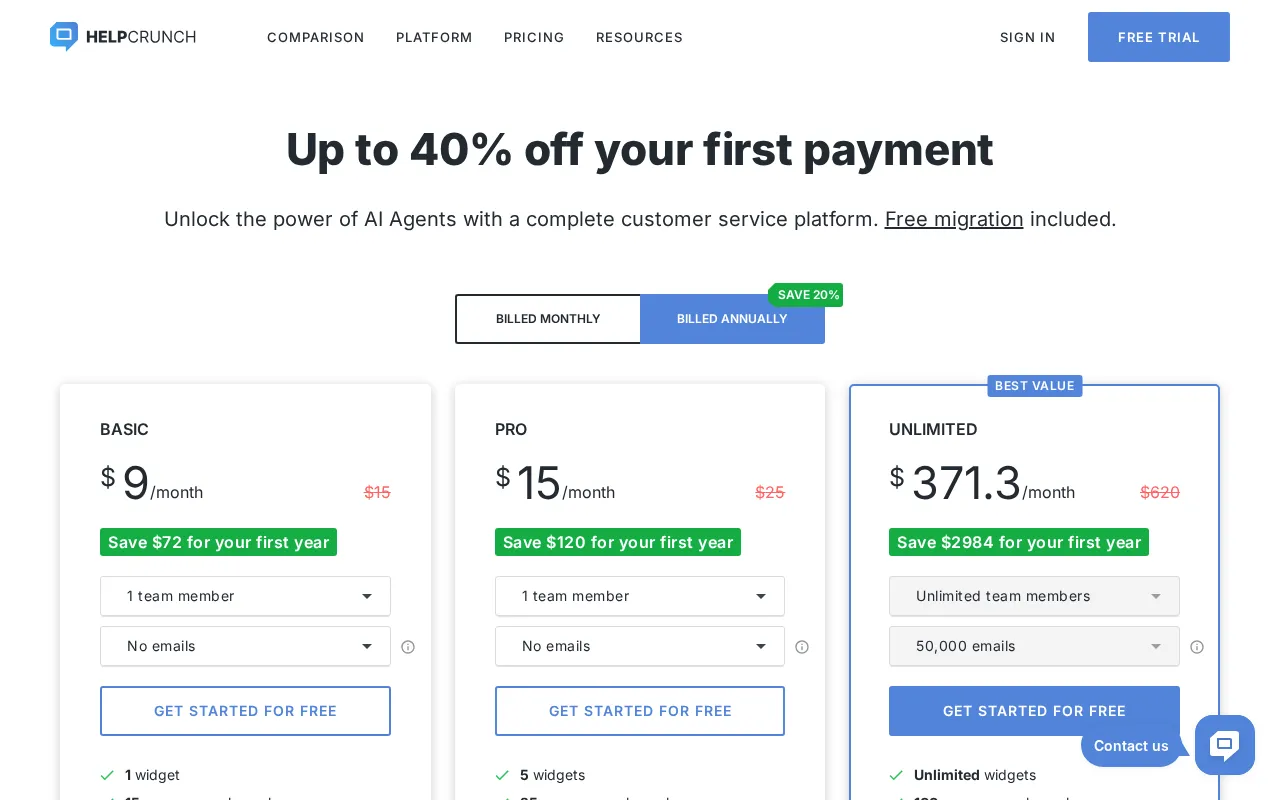
HelpCrunch pricing page, 20 November 2026
HelpCrunch’s pricing page, taken

What a team of 3, 5 or 10 pays

List prices in US dollars a month, on the cheapest plan that covers each team, counting each AI reply as one resolved conversation.

TeamMonthly billHow it adds up
3 people, 300 AI replies$1413 Pro team members at $20 on annual billing, plus a 300 AI conversation extension at $64.80 on top of the 50 included, and 5,000 emails at $16 so the team can reply by email.
5 people, 1,000 AI replies$2765 Pro team members at $20 on annual billing, plus 1,000 more AI conversations at $160 and 5,000 emails at $16.
10 people, 3,000 AI replies$62410 Pro team members at $20 on annual billing, plus 3,000 more AI conversations at $408 and 5,000 emails at $16, still below Unlimited at $495 with the same AI extension.

Costs beyond the headline price

  • Email is a volume you choose with the plan: 1,000 emails cost $11 a month on Basic with annual billing ($14 monthly), and 5,000 cost $16 ($20 monthly) on Basic or Pro. Inbox replies, campaigns, automated emails and chat messages resent by email all count toward it.
  • AI conversations past the 50 or 100 a plan includes are monthly extensions, from $23.20 for 100 on annual billing or $29 billed monthly, up to 100,000 a month.
  • AI data sources past 200 on Pro or 500 on Unlimited are a separate extension, priced by the hundred.
  • WhatsApp runs through 360dialog, which charges its own subscription, and Meta bills replies past 1,000 free a month per number, AI agent replies included. HelpCrunch adds no markup to those fees.
  • Annual billing is paid upfront and saves 20%: Basic is $12 against $15, Pro $20 against $25, and Unlimited $495 against $620.
  • When we checked on 20 November 2026, the pricing page took up to 40% off the first payment with the code BFCM2026, and named no end date.
  • Changing plan during a paid subscription charges at once, with proration applied within two business days. Switching only between monthly and annual billing triggers no payment.
  • Fees are non-refundable, and a cancellation takes effect immediately and disables the account, including its contacts and conversations.

When HelpCrunch is worth paying for

HelpCrunch is worth it for a small SaaS or online business that wants website chat, a knowledge base, popups and email campaigns in one place, and keeps its team small. Customers on its pricing page praise the price, the easy setup and a support team that helps with onboarding and migrating from Intercom. A team that only does support overpays: it buys an email volume just to answer email, pays again for every new teammate, and has to keep buying AI extensions once its AI agents handle more than a few dozen conversations a month.

HelpCrunch vs Rinhelp

TeamHelpCrunchRinhelp
3 people, 300 AI replies$141$49: Pro for the whole workspace, using 300 of its 5,000 AI replies; Free covers your team if you don’t need AI replies.
5 people, 1,000 AI replies$276$49: Pro for the whole workspace, using 1,000 of its 5,000 AI replies.
10 people, 3,000 AI replies$624$49: Pro for the whole workspace, using 3,000 of its 5,000 AI replies.

HelpCrunch pricing questions

Which HelpCrunch plan should a small team pick?

Pro, if you want AI agents, a chatbot or WhatsApp, since Basic has none of them. Add 5,000 emails if customers write in by email. Basic only suits a team that answers website chat and messengers by hand.

Is HelpCrunch cheaper on annual billing?

Yes, by 20%, paid for the whole year upfront. A Pro team member drops from $25 to $20 a month, and AI conversation extensions get the same 20% off, so 100 cost $23.20 instead of $29.

Does the HelpCrunch trial need a credit card?

No. The trial lasts 14 days without a card. Email sending is off during the trial unless you ask its team in chat, and if you add billing details early, the first charge comes automatically when the trial ends.

What happens when HelpCrunch runs out of AI conversations?

Nothing is charged automatically. The chatbot skips the AI agent block and moves to its next step until the next billing cycle, or until you click “Extend” under “Billing” and buy more.

Can I add team members in the middle of a month?

Yes. Raise the team member count under “Settings”, “Billing”, “Subscription” before you invite anyone. On an active subscription the change is charged at once, with proration applied within two business days.

Does HelpCrunch give refunds?

No. Its terms make fees non-refundable unless HelpCrunch breaches them and doesn’t fix it within 30 days of your written notice. Cancelling stops future charges straight away, but it also shuts the account.
Sources

We checked every source below on 20 November 2026.

Try Rinhelp next to HelpCrunch.

Start free with up to 3 teammates and 50 AI replies. Keep HelpCrunch running until you’re sure.

Start free