Start free

HubSpot pricing explained

By , founder of Rinhelp · Facts checked

The short answer

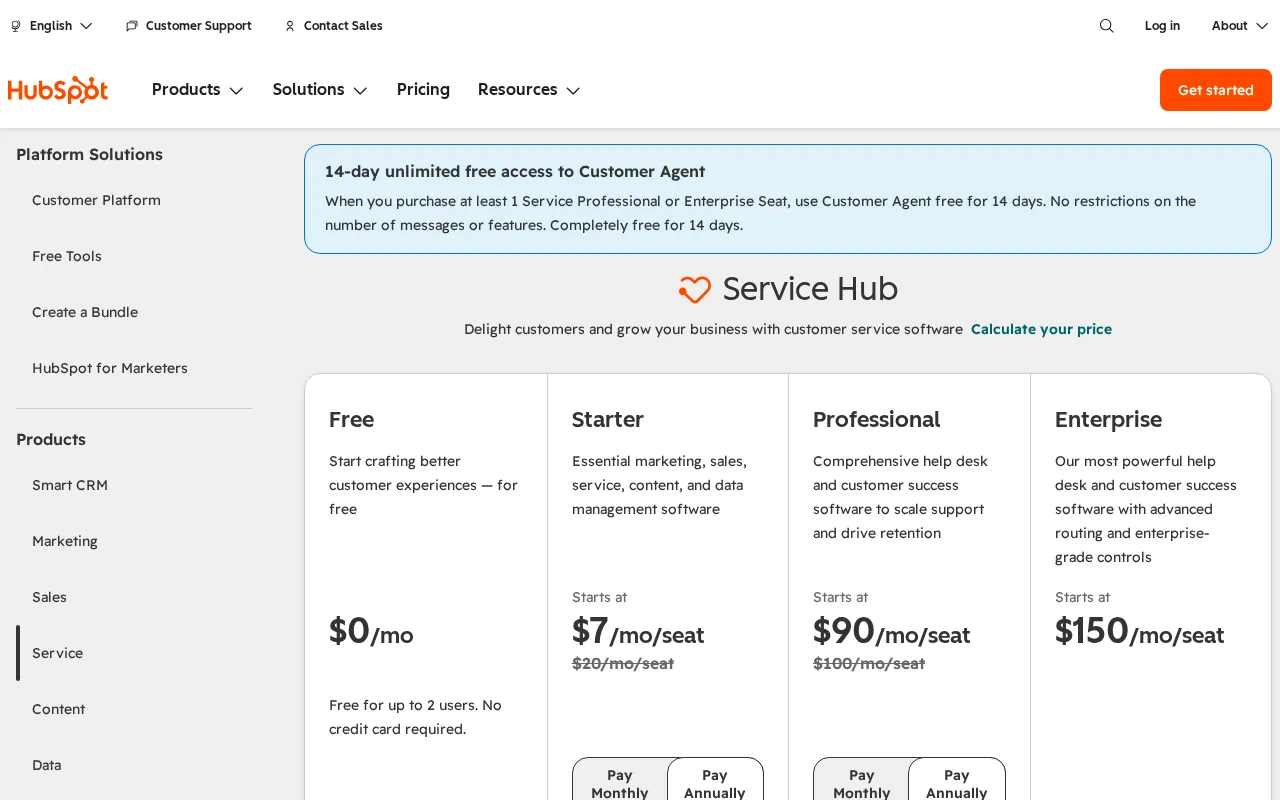
HubSpot Service Hub bills by the seat: Starter is $7 a seat a month on a yearly plan, but the customer agent, its AI that answers customers, comes only with Professional at $90 a seat and a one-time $1,500 onboarding fee. Every conversation the agent resolves spends 50 HubSpot Credits, $0.50, once Professional’s 3,000 a month are gone, so a team of 5 whose agent resolves 1,000 conversations pays about $920 a month, half of it in credits. Rinhelp costs that same team $49 a month, with 5,000 AI replies included.

See Rinhelp on your own site. Enter your website and Rin builds your help desk from it: a chat widget, a help center and an inbox.

Free. No sign-up to look. Ready in a minute or two.

Is your help center somewhere else?

Rin will read . If your help articles or docs live at another address, like help. or a Notion page, Rin can read those too.

Where is your help center?

Rin reads it along with and turns it into your help center.

HubSpot pricing at a glance

Cheapest plan with AI
Professional
How it bills
Per seat, plus credits for each AI resolution
Free plan
Yes: 2 users, with HubSpot branding on chat and email
AI answers cost
$0.50 per resolved conversation (50 credits), after 3,000 included credits

HubSpot plans

Free

Billed yearly
Free for up to 2 users
Billed monthly
Free for up to 2 users
  • Free service, sales and marketing tools
  • Live chat, with HubSpot branding
  • 1-to-1 email, with HubSpot branding
  • 3 snippets and 3 email templates
  • 10 reporting dashboards

Watch out for

  • HubSpot branding stays on your live chat, your 1-to-1 emails and your meetings link until you pay for Starter.
  • Snippets and email templates stop at 3 each, which a busy inbox outgrows quickly.
  • No HubSpot Credits come with it, and the customer agent isn’t available.

Starter

Billed yearly
$7 a seat a month for new customers, from a $20 list price
Billed monthly
$10 a seat a month for new customers, from a $20 list price
  • Everything in Free, with higher limits
  • 500 HubSpot Credits a month
  • Live chat without HubSpot branding
  • Ticketing
  • Calling, 500 minutes and 1 phone number
  • Agent Builder
  • Up to 5,000 snippets

Watch out for

  • The $7 and $10 prices are discounts for new customers on a $20 list price, and HubSpot’s terms let it raise your seats to list price at renewal with 30 days’ notice.
  • There is no AI that answers customers here: the customer agent starts at Professional.
  • WhatsApp, the knowledge base and the help desk workspace all wait for Professional.
  • Help from HubSpot itself is by email only. Phone support comes with Professional.

Professional

Billed yearly
$90 a seat a month
Billed monthly
$100 a seat a month, on a yearly commitment
  • Everything in Starter
  • 3,000 HubSpot Credits a month
  • Customer agent
  • Help desk workspace
  • Knowledge base, up to 2,000 articles
  • WhatsApp, up to 1,000 messages a month
  • Customer feedback surveys

Watch out for

  • A one-time onboarding fee of $1,500 is required on top of the seats.
  • Choosing to pay monthly still ties you in for a year: the $100 seat is billed each month against a yearly commitment.
  • Once the 3,000 included credits are spent, which covers 60 resolved conversations a month if nothing else uses them, each one the customer agent resolves costs 50 credits, $0.50, that you buy separately.
  • WhatsApp stops at 1,000 messages a month, and you get 1 knowledge base of up to 2,000 articles.

Enterprise

Billed yearly
From $150 a seat a month, through sales, with no billing choice on the page
Billed monthly
From $150 a seat a month, through sales, with no billing choice on the page
  • Everything in Professional
  • 5,000 HubSpot Credits a month
  • Conditional SLAs
  • Skill-based routing
  • Up to 25 knowledge bases
  • Standard sandbox account

Watch out for

  • You can only buy it through HubSpot’s sales team, and $150 a seat is where quotes start.
  • You can’t move down to Professional before your term ends.
  • WhatsApp is still capped at 1,000 messages a month, the same as Professional.
HubSpot pricing page, 11 November 2026
HubSpot’s pricing page, taken

What a team of 3, 5 or 10 pays

List prices in US dollars a month, on the cheapest plan that covers each team, counting each AI reply as one resolved conversation.

TeamMonthly billHow it adds up
3 people, 300 AI replies$3903 Professional seats at $90 on annual billing, plus 300 resolutions by the customer agent at 50 credits each, $120 after the 3,000 included credits. A one-time $1,500 onboarding fee comes on top.
5 people, 1,000 AI replies$9205 Professional seats at $90, plus 1,000 resolutions, 47,000 credits beyond the included 3,000 at $0.01.
10 people, 3,000 AI replies$2,37010 Professional seats at $90, plus 3,000 resolutions, 147,000 credits beyond the included 3,000 at $0.01.

Costs beyond the headline price

  • Onboarding: $1,500 once for Professional and $3,500 for Enterprise, delivered remotely, and HubSpot won’t sell either plan without it.
  • Credits past your monthly allowance: $0.01 each with Pay-as-You-Go, invoiced 10 credits at a time, or capacity packs of 1,000 credits a month for $10 that stay on your bill for the rest of the term.
  • Customer agent on phone calls, still in beta, spends 50 credits, $0.50, for every minute of conversation, and the calling minutes it uses may cost extra.
  • Monthly payment costs more for the same seat: $100 against $90 on Professional, and $10 against $7 on Starter.
  • Every teammate who works tickets needs a paid seat: a Core Seat on Starter, a Service Seat on Professional or Enterprise. View-only seats, for people who only look, cost nothing.
  • Included credits don’t stack across hubs: buy Service Hub and Sales Hub Professional and you still get one allowance of 3,000.
  • You can’t move to a cheaper plan before your term ends, and prepaid fees aren’t returned if you stop early.

When HubSpot is worth paying for

HubSpot is worth its price when your sales and marketing teams already live in its CRM and support is the missing piece. Service Hub then joins them on 1 platform, with 1 view of every interaction a customer has had with the business. A team that only needs to answer email and chat pays for a CRM it barely opens, plus a $1,500 onboarding fee before its customer agent answers anyone.

HubSpot vs Rinhelp

TeamHubSpotRinhelp
3 people, 300 AI replies$390$49: Pro for the whole workspace, using 300 of its 5,000 AI replies; Free covers your team if you don’t need AI replies.
5 people, 1,000 AI replies$920$49: Pro for the whole workspace, using 1,000 of its 5,000 AI replies.
10 people, 3,000 AI replies$2,370$49: Pro for the whole workspace, using 3,000 of its 5,000 AI replies.

HubSpot pricing questions

Which HubSpot Service Hub plan should a small support team pick?

Starter if people answer every conversation and you want unbranded live chat and ticketing at the lowest seat price. Pick Professional only once you want the customer agent, a knowledge base or WhatsApp, and budget for its onboarding fee on top of the seats.

Does paying HubSpot monthly avoid a yearly contract?

Only on Starter, where the monthly option is a monthly commitment. On Professional, paying monthly still means committing for a year, so the lower $90 yearly seat is usually the better deal once you are sure.

Do teammates who only read tickets need a paid HubSpot seat?

No. HubSpot gives view-only seats at no extra cost to people who look at your account without changing anything. Anyone who replies or edits tickets on Professional or Enterprise needs a paid Service Seat.

Will my HubSpot Starter price go up later?

It can. The $7 and $10 seat prices are for new customers, the list price is $20, and HubSpot may raise renewal fees up to its list price after telling you at least 30 days before the renewal.

Can I drop from Professional to Starter mid-contract?

No. HubSpot’s terms only allow a downgrade at your next renewal date, with a new order form, so you keep paying for Professional until the term ends.

Can I test the customer agent before paying for credits?

Yes, once you have at least 1 Professional or Enterprise seat. You can opt in to 14 days of free access with no credits spent, if your account has used fewer than 1,250 customer agent credits in the past year. The agent switches itself off when the 14 days end.
Sources

We checked every source below on 11 November 2026.

Try Rinhelp next to HubSpot.

Start free with up to 3 teammates and 50 AI replies. Keep HubSpot running until you’re sure.

Start free