Start free

Kore.ai pricing explained

By , founder of Rinhelp · Facts checked

The short answer

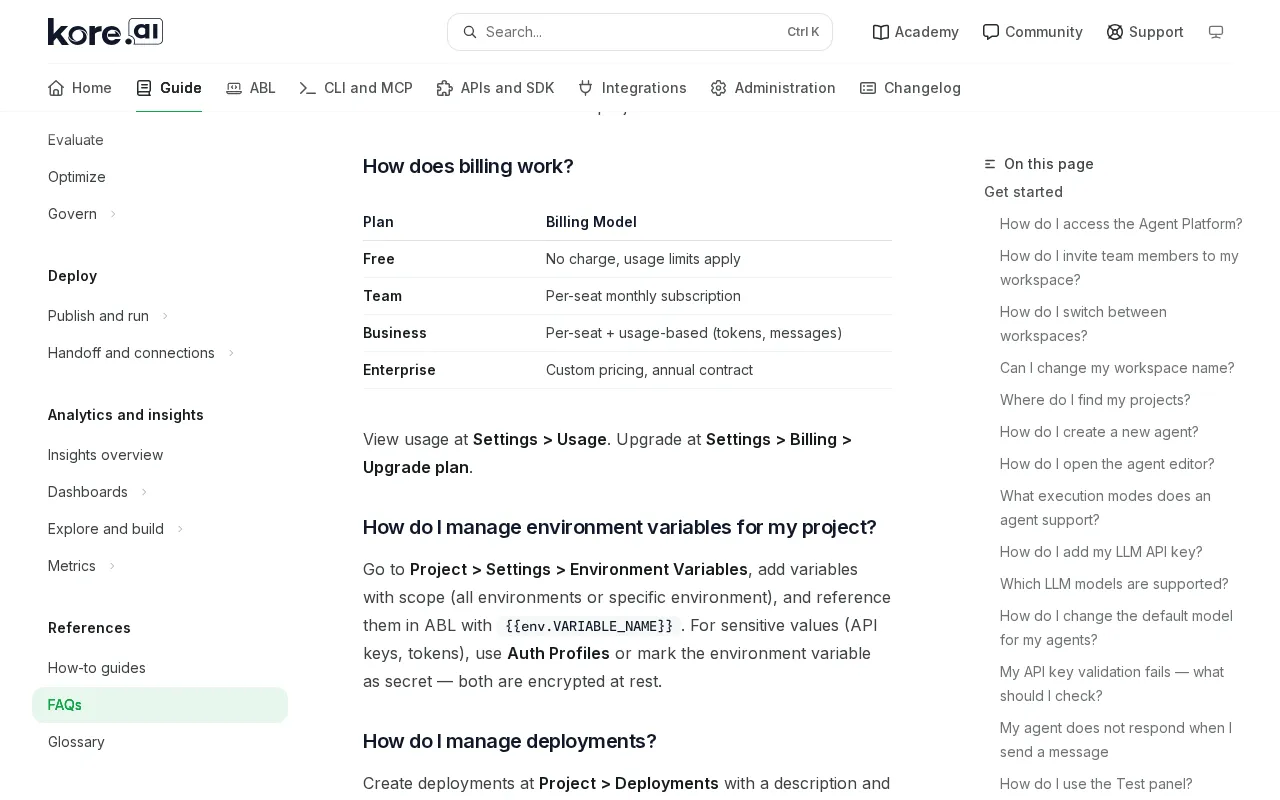
Kore.ai’s docs name 4 plans and how each bills: Free costs nothing within usage limits, Team charges a monthly fee per seat, Business adds the tokens and messages you use to that fee, and Enterprise is a custom yearly contract. No paid plan carries a published price, and kore.ai/pricing reads “This page could not be found”, so a team of 5 with 1,000 conversations a month gets its number from Kore.ai’s sales team. Your agents also run on your own key with an AI model provider such as OpenAI or Anthropic, and that key needs quota or credits of its own. For that team, Rinhelp is $49 a month with 5,000 AI replies built in.

See Rinhelp on your own site. Enter your website and Rin builds your help desk from it: a chat widget, a help center and an inbox.

Free. No sign-up to look. Ready in a minute or two.

Is your help center somewhere else?

Rin will read . If your help articles or docs live at another address, like help. or a Notion page, Rin can read those too.

Where is your help center?

Rin reads it along with and turns it into your help center.

Kore.ai pricing at a glance

Cheapest plan with AI
Free, with usage limits
How it bills
Quoted by sales
Free plan
A free plan is listed, though the quick start opens sign-up only to approved domains
AI answers cost
Not published

Kore.ai plans

Free

Billed yearly
No charge, usage limits apply
Billed monthly
No charge, usage limits apply
  • A quota of sessions and LLM tokens
  • A warning email at 80% of the quota
  • New sessions paused past 100% until the next billing cycle or an upgrade
  • Each session counted whatever its number of messages, Studio tests included

Watch out for

  • When usage passes 100% of the quota, Kore.ai stops starting new sessions until the next billing cycle or an upgrade. A warning email arrives at 80%.
  • Conversations you run in the Studio test panel use up the same quota as real customers.

Team

Billed yearly
Not listed: Team is a monthly subscription
Billed monthly
Per seat, price not published
  • A per-seat monthly subscription
  • A session and LLM token quota, with the same 80% warning and 100% pause
  • Usage by session and by LLM token, per provider and model
  • Upgrades take effect at once, prorated for the billing period

Watch out for

  • SSO, audit log export and analytics export aren’t on this plan: the FAQ places them on Business and Enterprise.
  • The same quota rules apply, so a busy week can pause new sessions until you move up a plan.

Business

Billed yearly
No yearly price or term listed
Billed monthly
Per seat plus usage (tokens, messages), price not published
  • Per-seat billing plus usage-based tokens and messages
  • SSO over SAML 2.0 or OIDC, per the FAQ, though the settings page says Enterprise only
  • Audit log export to SIEM systems, per the FAQ, though the settings page lists other plans
  • Analytics export

Watch out for

  • On top of the seats, tokens and messages are billed by use, at rates Kore.ai doesn’t publish, so the bill moves with your traffic.
  • Self-hosting, a full export of the workspace and encryption with your own keys all stay on Enterprise.

Enterprise

Billed yearly
Quote only, custom pricing on an annual contract
Billed monthly
Not listed: Enterprise is an annual contract
  • Custom pricing on an annual contract
  • SSO and audit log export
  • Analytics export
  • Full workspace export through your account team
  • A self-hosted option, with dedicated support for installation and operations

Watch out for

  • It is a yearly contract, so you commit to a full year at once.
  • Call recording is Enterprise only, and you can’t switch it on yourself: your Kore.ai representative has to enable it.
  • A full workspace export is handled by your account team, not from a button in the product.
Kore.ai pricing page, 11 November 2026
Kore.ai’s pricing page, taken

What a team of 3, 5 or 10 pays

List prices in US dollars a month, on the cheapest plan that covers each team, counting each AI reply as one resolved conversation.

TeamMonthly billHow it adds up
3 people, 300 AI repliesQuote onlyKore.ai prints no rate, so 300 conversations are priced by its sales team, and the contact center your people answer handoffs in is a separate bill.
5 people, 1,000 AI repliesQuote onlyNo published price for 1,000 conversations: the quote comes after a demo, plus the seats of the desktop Kore.ai transfers customers to.
10 people, 3,000 AI repliesQuote only3,000 conversations sit on a custom or annual contract that only Kore.ai quotes, with your contact center billed on top.

Costs beyond the headline price

  • The AI model runs on your own provider account. Setup asks you to register an API key with a provider such as OpenAI, Anthropic, Azure, Google or Bedrock, and the FAQ tells you to check that the key has enough quota or credits when validation fails.
  • The workspace also has a credit balance with a “Top Up Credits” card, and Arch, the AI architect, can run on Kore.ai’s platform credits. The docs give no price for a credit.
  • Every session counts toward your usage however many messages it holds, and so does every test you run while building.
  • Moving to a bigger plan applies at once, and you pay a prorated share for the rest of the billing period.
  • Custom deals, dedicated resources, encryption with your own keys and enterprise SLAs all go through “Contact Sales”.
  • Customers who want a person are passed to a separate contact center platform, such as Kore.ai’s SmartAssist, Salesforce, ServiceNow, Five9 or Genesys, where your team answers them. The docs give no price for those seats.

When Kore.ai is worth paying for

Kore.ai earns its quote at a large company that wants a single platform for voice and digital AI agents, run by builders who define agents, evaluate them and trace each decision. It suits a team that must pick its own LLM provider, keep its keys in its own vault, or host the platform itself, and that already runs a contact center for the conversations the AI passes on. A small team answering email and chat pays for a building platform it barely uses, then pays again for the model, and needs a contact center such as Salesforce or Genesys to answer handoffs.

Kore.ai vs Rinhelp

TeamKore.aiRinhelp
3 people, 300 AI repliesQuote only$49: Pro for the whole workspace, using 300 of its 5,000 AI replies; Free covers your team if you don’t need AI replies.
5 people, 1,000 AI repliesQuote only$49: Pro for the whole workspace, using 1,000 of its 5,000 AI replies.
10 people, 3,000 AI repliesQuote only$49: Pro for the whole workspace, using 3,000 of its 5,000 AI replies.

Kore.ai pricing questions

Which Kore.ai plan fits a small team?

Free, while you are building and testing, since it costs nothing up to its usage limits. Team adds paid seats month to month, and Business is the step for exporting analytics, and for SSO and audit log export if Kore.ai confirms them: the FAQ puts both on Business, while the workspace settings page marks SSO Enterprise only and audit log export “Professional and Enterprise”. Enterprise is for self-hosting or a full workspace export.

Can we try Kore.ai before we pay?

Yes, in 2 ways. The Free plan costs nothing within its limits, though getting in may take a request: the FAQ says anyone can sign up by email, Google or GitHub, while the quick start opens sign-up only to approved domains and asks everyone else to contact Kore.ai. Kore.ai’s Proof Concierge also builds a custom agent for your use case at no charge, and says a working proof can reach you in as little as 1 week.

What happens when a Kore.ai workspace runs out of quota?

An email warns you at 80% of the session or token quota. Past 100%, new agent sessions are paused until you upgrade or the next billing cycle starts, while sessions already running carry on.

What counts as a session on a Kore.ai bill?

A session is 1 conversation between a person and an agent, from its first message to its end, billed the same whether it holds 2 messages or 50. Sessions in the Studio test panel count too.

Can I change Kore.ai plans in the middle of a billing period?

Upgrades, yes. You pick a plan under “Settings” > “Billing”, it applies right away, and the charge is prorated for the current period. The docs don’t say how a downgrade or cancellation works, so ask before you commit to Enterprise’s yearly contract.

Do I pay Kore.ai for the AI model?

Kore.ai’s docs don’t say who bills the tokens. You register your own key for OpenAI, Anthropic, Azure, Google or Bedrock, and that key needs quota or credits with its provider. Business also bills the tokens and messages you use on top of its seats, and Kore.ai offers platform credits, which Arch can use, with no published rate for any of them.
Sources

We checked every source below on 11 November 2026.

Try Rinhelp next to Kore.ai.

Start free with up to 3 teammates and 50 AI replies. Keep Kore.ai running until you’re sure.

Start free