Start free

Provide Support pricing explained

By , founder of Rinhelp · Facts checked

The short answer

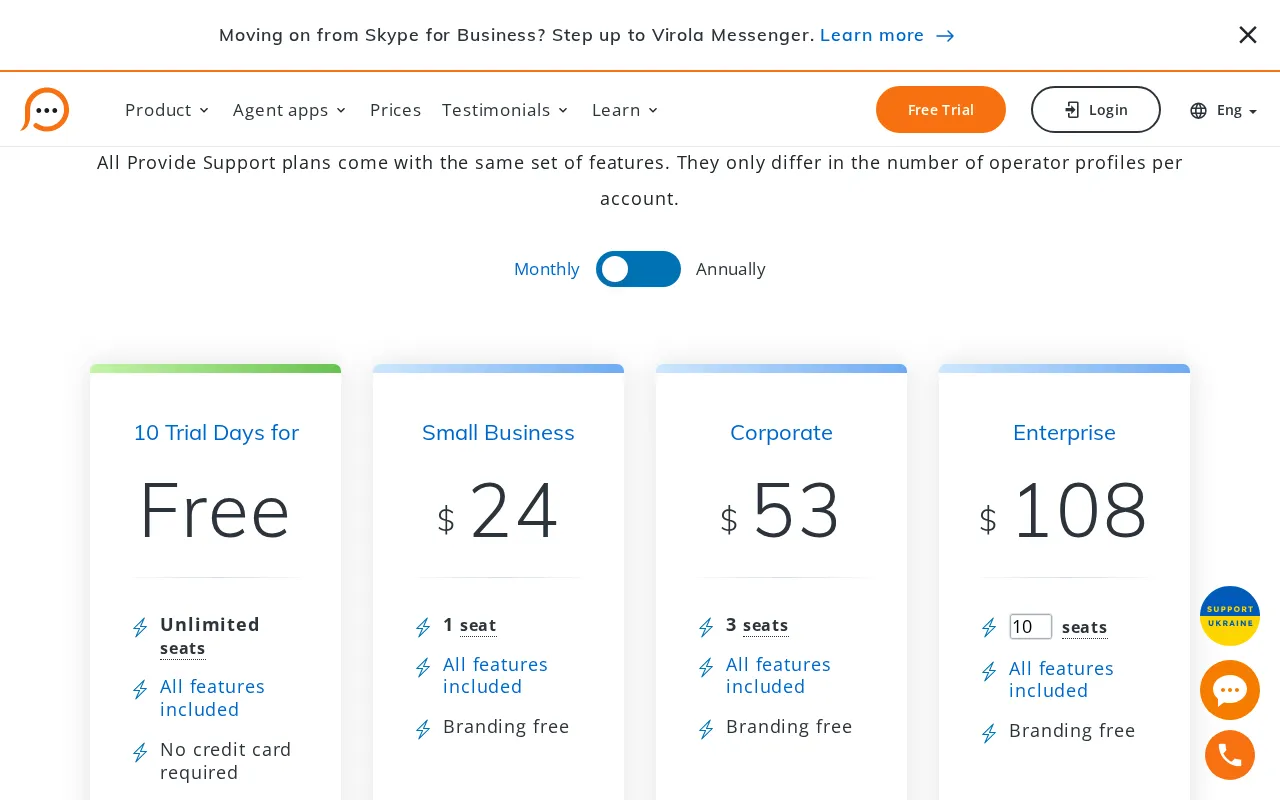
Provide Support sells three packages with identical features that differ only in seats: Small Business is $24 a month for 1 seat, Corporate $53 for 3 and Enterprise $108 for 10, and paying for a whole year cuts each roughly in half. Nothing in it answers with AI, so no usage fee sits on top, but a team of 5 can’t buy 5 seats: it needs Enterprise, $713 a year or about $59.42 a month. Rinhelp costs that same team $49 a month, with 5,000 AI replies included.

See Rinhelp on your own site. Enter your website and Rin builds your help desk from it: a chat widget, a help center and an inbox.

Free. No sign-up to look. Ready in a minute or two.

Is your help center somewhere else?

Rin will read . If your help articles or docs live at another address, like help. or a Notion page, Rin can read those too.

Where is your help center?

Rin reads it along with and turns it into your help center.

Provide Support pricing at a glance

Cheapest plan with AI
None
How it bills
Flat package by number of seats
Free plan
No: a 10-day trial with every feature and no credit card, after which agent logins are locked until you pay
AI answers cost
No AI that answers customers

Provide Support plans

Small Business

Billed yearly
$156 a year for 1 seat
Billed monthly
$24 a month for 1 seat, or $56 for 3 months and $96 for 6 months
  • 1 agent seat
  • All features included
  • Branding free
  • Unlimited chats and websites
  • Agent apps for Windows, macOS, Linux, the web, iOS and Android

Watch out for

  • One seat means one agent profile, and the license caps the profiles in the account, so a second person can’t share it at the same time.
  • A second agent means moving to Corporate, which prices 3 seats at $53 a month or $310 a year.

Corporate

Billed yearly
$310 a year for 3 seats
Billed monthly
$53 a month for 3 seats, or $116 for 3 months and $189 for 6 months
  • 3 agent seats
  • All features included
  • Branding free
  • Unlimited chats and websites
  • Agent apps for Windows, macOS, Linux, the web, iOS and Android

Watch out for

  • The fourth agent has nowhere to go but Enterprise, which prices 10 seats at $108 a month or $713 a year.
  • Every agent profile in the account takes one of the 3 seats, even one nobody signs in with.

Enterprise

Billed yearly
$713 a year for 10 seats, or $1,200 a year for 20
Billed monthly
$108 a month for 10 seats, or $252 for 3 months and $432 for 6 months; more seats, up to 100, are priced on the page, such as $204 a month for 20
  • 10 to 100 agent seats
  • All features included
  • Branding free
  • Unlimited chats and websites
  • Extra discounts past 10 seats

Watch out for

  • Seats past 10 are priced by a calculator on the pricing page, such as $204 a month or $1,200 a year for 20.
  • No package holds more than 100 seats.
Provide Support pricing page, 20 November 2026
Provide Support’s pricing page, taken

What a team of 3, 5 or 10 pays

List prices in US dollars a month, on the cheapest plan that covers each team, counting each AI reply as one resolved conversation.

TeamMonthly billHow it adds up
3 people, 300 AI replies$26Corporate at $310 a year for 3 seats, about $25.83 a month. Nothing in Provide Support answers with AI, so people answer all 300 chats.
5 people, 1,000 AI replies$59Enterprise at $713 a year for 10 seats, about $59.42 a month, since no package sits between Corporate’s 3 seats and 10. Chats are unlimited, and there is no AI to price.
10 people, 3,000 AI replies$59Enterprise at $713 a year for 10 seats, about $59.42 a month, with unlimited chats and no AI answering them.

Costs beyond the headline price

  • Billing terms of 1, 3, 6 or 12 months: Corporate, for example, is $53 for a month, $116 for 3 months, $189 for 6 and $310 for a year, so the full year costs about half what 12 monthly bills would.
  • Automatic chat translation is an optional add-on at $249 a year, translating messages between agents and visitors in 39 languages.
  • Hosting the chat link on your own domain is $49 a year for each domain, and once Provide Support sets a domain up it can’t be changed: a new one is a new purchase.
  • Branding removal costs nothing: every paid plan can hide the “Powered by ProvideSupport” mark.
  • There is no AI fee because there is no AI. The FAQ says Provide Support offers no chatbot, so every chat needs an agent.
  • Card and PayPal payments renew automatically, and only support can switch card renewal off. A failed charge is retried on the 4th, 8th and 12th day.
  • The 30-day money-back guarantee covers your first payment only. The FAQ lets you ask to cancel at any time, but names no other refund.

When Provide Support is worth paying for

Provide Support is worth its price for a team that wants every website chat answered by a person and sees that as the service itself. Every feature comes on the smallest plan, agents can chat from Windows, macOS, Linux, the web or their phones, and a yearly bill for 3 seats is $310. Teams of 4 to 9 overpay, since the next package up holds 10 seats.

Provide Support vs Rinhelp

TeamProvide SupportRinhelp
3 people, 300 AI replies$26$49: Pro for the whole workspace, using 300 of its 5,000 AI replies; Free covers your team if you don’t need AI replies.
5 people, 1,000 AI replies$59$49: Pro for the whole workspace, using 1,000 of its 5,000 AI replies.
10 people, 3,000 AI replies$59$49: Pro for the whole workspace, using 3,000 of its 5,000 AI replies.

Provide Support pricing questions

Which Provide Support plan should I choose?

Count the people who will chat. Small Business fits 1, Corporate fits 2 or 3, and from 4 people you need Enterprise, which starts at 10 seats. All three have the same features, so seats are the only thing you are choosing.

Should I pay Provide Support monthly or yearly?

Yearly, if you’re sure you’ll stay. Small Business is $24 a month or $156 a year, so a year paid up front costs about half. The 3-month and 6-month terms sit in between, at $56 and $96 for Small Business.

Is there a free trial?

Yes, 10 days with every feature and as many agent profiles as you like, and only an account name, email and password to start. When it ends, agent logins lock until you pay, and before buying you trim the agent profiles to fit your package.

Can I get a refund from Provide Support?

On your first payment, yes: its manual promises the full amount back if you stop within a month of paying. Later renewals aren’t covered by that guarantee.

Can I change or pause my plan?

You can upgrade or downgrade at any time. On an upgrade, the balance left on your account comes off the new package’s price, and a new billing period starts that day. To take a break, ask support to suspend the account, which keeps your settings and balance until you return.

How can I pay for Provide Support?

You buy from the “Purchase” page in your account’s Control Panel, which creates an invoice under “Billing”. It takes cards, UnionPay, PayPal, Alipay, Bitcoin, wire transfer, ACH, US and Canadian checks in US dollars, and purchase orders.
Sources

We checked every source below on 20 November 2026.

Try Rinhelp next to Provide Support.

Start free with up to 3 teammates and 50 AI replies. Keep Provide Support running until you’re sure.

Start free