Start free

Spike pricing explained

By , founder of Rinhelp · Facts checked

The short answer

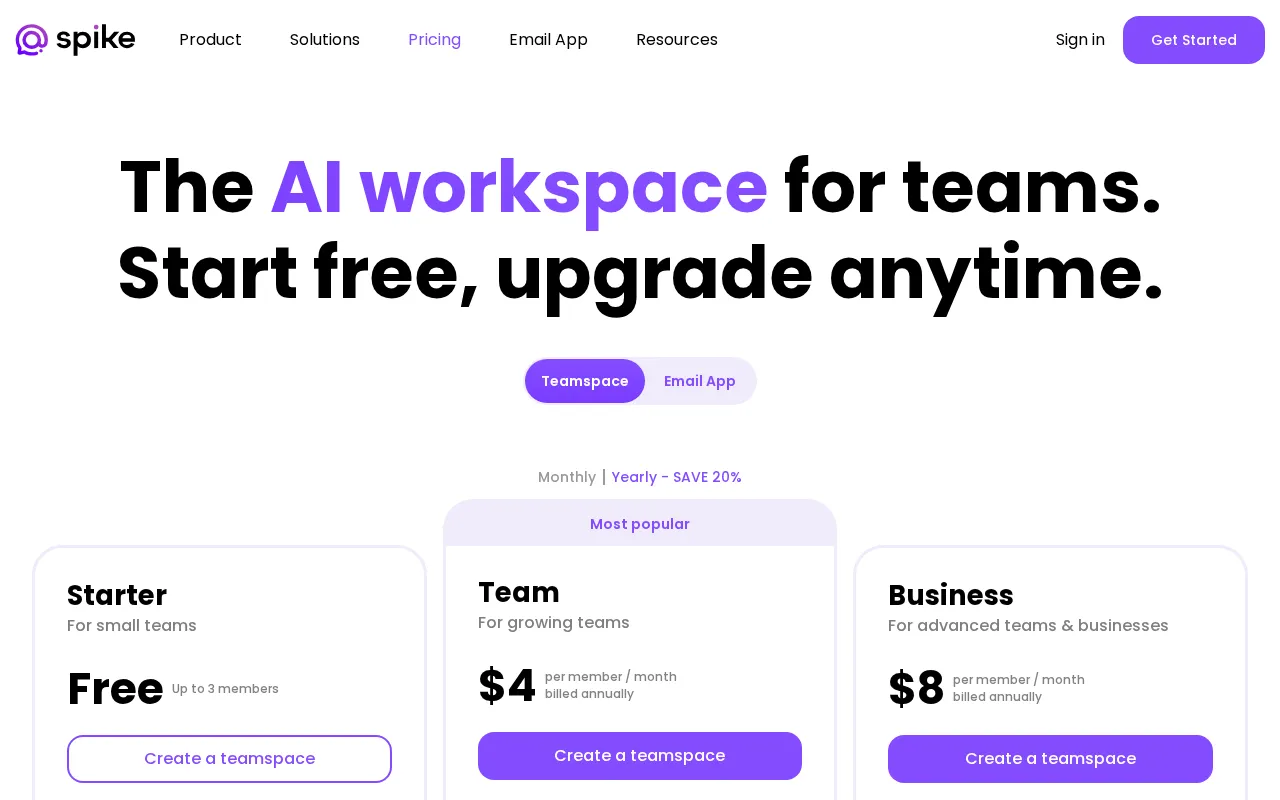
Spike prices its Teamspace by the member: Starter costs nothing for a group of up to 3, then Team runs $4 and Business $8 per person each month when you pay for a year up front, with no charge for AI on either. Five people sharing a support address on Team pay $20 a month, a low bill for chat-style email, team chat and calls, though Spike AI drafts and summarizes for your team rather than answering customers itself. Rinhelp costs that same team $49 a month, with 5,000 AI replies included.

See Rinhelp on your own site. Enter your website and Rin builds your help desk from it: a chat widget, a help center and an inbox.

Free. No sign-up to look. Ready in a minute or two.

Is your help center somewhere else?

Rin will read . If your help articles or docs live at another address, like help. or a Notion page, Rin can read those too.

Where is your help center?

Rin reads it along with and turns it into your help center.

Spike pricing at a glance

Cheapest plan with AI
Starter, with 10 AI queries; Team for unlimited AI
How it bills
Per member
Free plan
Yes: Starter, up to 3 members, without the Shared Inbox
AI answers cost
Spike AI included, but it drafts and summarizes rather than answering customers

Spike plans

Starter

Billed yearly
Free, for up to 3 members
Billed monthly
Free, for up to 3 members
  • 1 teamspace
  • Free @spike.team email address
  • 60 days of search history
  • 15 GB storage space
  • Spike AI, 10 queries
  • Standard support

Watch out for

  • The Shared Inbox and the WhatsApp inbox are both missing, so Starter has no inbox the team answers together.
  • Spike AI is capped at 10 queries for writing, summaries, the assistant and translation, and the AI Feed of unread summaries isn’t there at all.
  • Search looks back only 60 days, calls are 1:1, uploads top out at 15 MB and you get 20 collaborative notes and tasks.
  • Addresses end in @spike.team: a custom domain, or connecting the one you own, starts on Team.

Team

Billed yearly
$4 a member a month
Billed monthly
$5 a member a month
  • Everything in Starter
  • Unlimited Spike AI
  • Free custom email domain
  • Unlimited search history
  • 100 GB storage space
  • Shared Inbox

Watch out for

  • The custom domain is free only for the first year, and only when you pay annually.
  • Group calls hold up to 30 people, and each member gets 100 GB of storage with 100 MB uploads.
  • Spike’s help page lists Teamspace Team plans among those it won’t refund, so pay monthly before you commit to a year.

Business

Billed yearly
$8 a member a month
Billed monthly
$10 a member a month
  • Everything in Team
  • 1 TB storage space
  • Large file upload of 500 MB
  • VIP support
  • Dedicated account manager

Watch out for

  • The Shared Inbox and Spike AI work as they do on Team, so the extra $4 a member buys no more inbox or AI.
  • Video call recording and SAML single sign-on carry a “SOON” tag on the plan card, so they aren’t yours on day 1.
Spike pricing page, 11 November 2026
Spike’s pricing page, taken

What a team of 3, 5 or 10 pays

List prices in US dollars a month, on the cheapest plan that covers each team, counting each AI reply as one resolved conversation.

TeamMonthly billHow it adds up
3 people, 300 AI replies$123 Team members at $4 on annual billing. Spike AI drafts replies, but nothing answers customers on its own.
5 people, 1,000 AI replies$205 Team members at $4 on annual billing, with no AI answering customers.
10 people, 3,000 AI replies$4010 Team members at $4 on annual billing, with no AI answering customers.

Costs beyond the headline price

  • Monthly billing on a paid Teamspace costs 25% more per seat: $5 rather than $4 on Team, $10 rather than $8 on Business.
  • There is no per-reply or credit fee for AI: Spike AI is unlimited on Team and Business, and Starter gets 10 queries.
  • A new custom domain comes free for a year with annual billing, on .net, .org, .co.uk, .in and a handful of other endings. The pricing page gives no price for the years after.
  • Plans renew on their own until cancelled. To end a Teamspace plan you ask Spike’s support team, and paid features last until the billing cycle closes.
  • Swapping one person for another can cost a seat: Spike’s pricing help page says to remove the old user before adding the new one, to avoid being charged for an additional seat.
  • Large teams can ask Spike’s sales team for an Enterprise plan, which has no public price.
  • The Email App, which runs on an address you already own, is billed apart from Teamspace: Pro is $6 and Ultimate $12 a user a month on annual billing.

When Spike is worth paying for

Spike earns its price for a small company that wants its email, team chat, shared notes and video calls to live in one app, and gets a fresh business domain thrown in for the first year of a yearly plan. At $4 a member, it shares a support address with assignment and status labels, and the AI comes without metering. No Spike plan lists a help center or chat widget for a website, so teams that want customers to help themselves need another vendor for those.

Spike vs Rinhelp

TeamSpikeRinhelp
3 people, 300 AI replies$12$49: Pro for the whole workspace, using 300 of its 5,000 AI replies; Free covers your team if you don’t need AI replies.
5 people, 1,000 AI replies$20$49: Pro for the whole workspace, using 1,000 of its 5,000 AI replies.
10 people, 3,000 AI replies$40$49: Pro for the whole workspace, using 3,000 of its 5,000 AI replies.

Spike pricing questions

Which Spike plan does a support team need?

Team, as it is the first plan with the Shared Inbox and with WhatsApp connected as a shared inbox. Business keeps the same inbox and AI, so move up only when you need its storage, 50-person calls or VIP support.

Can I try the Shared Inbox before paying?

Not on Starter, which leaves it out, and Spike’s pricing page mentions no trial of the paid Teamspace plans. As Team and Business aren’t refundable, pay monthly at $5 a member until you know it fits, then switch to a year.

Should I pay Spike monthly or annually?

Annually, once you are sure: the yearly price is 20% lower and it brings the first year of a new domain for free. Monthly keeps you free to leave at the end of any month, which matters more since paid Teamspace seats can’t be refunded.

How do I cancel a Spike Teamspace plan?

Spike asks you to contact its support team to cancel a Teamspace plan. You keep the paid features until the end of the billing cycle you already paid for.

What is the difference between Teamspace and the Email App?

Teamspace gives your team new addresses, team chat and, from Team, a Shared Inbox. The Email App upgrades the address you already have, priced per user as Pro or Ultimate, and its plan list has no Shared Inbox.
Sources

We checked every source below on 11 November 2026.

Try Rinhelp next to Spike.

Start free with up to 3 teammates and 50 AI replies. Keep Spike running until you’re sure.

Start free