DocsBot pricing questions
Which DocsBot plan should a small team pick?
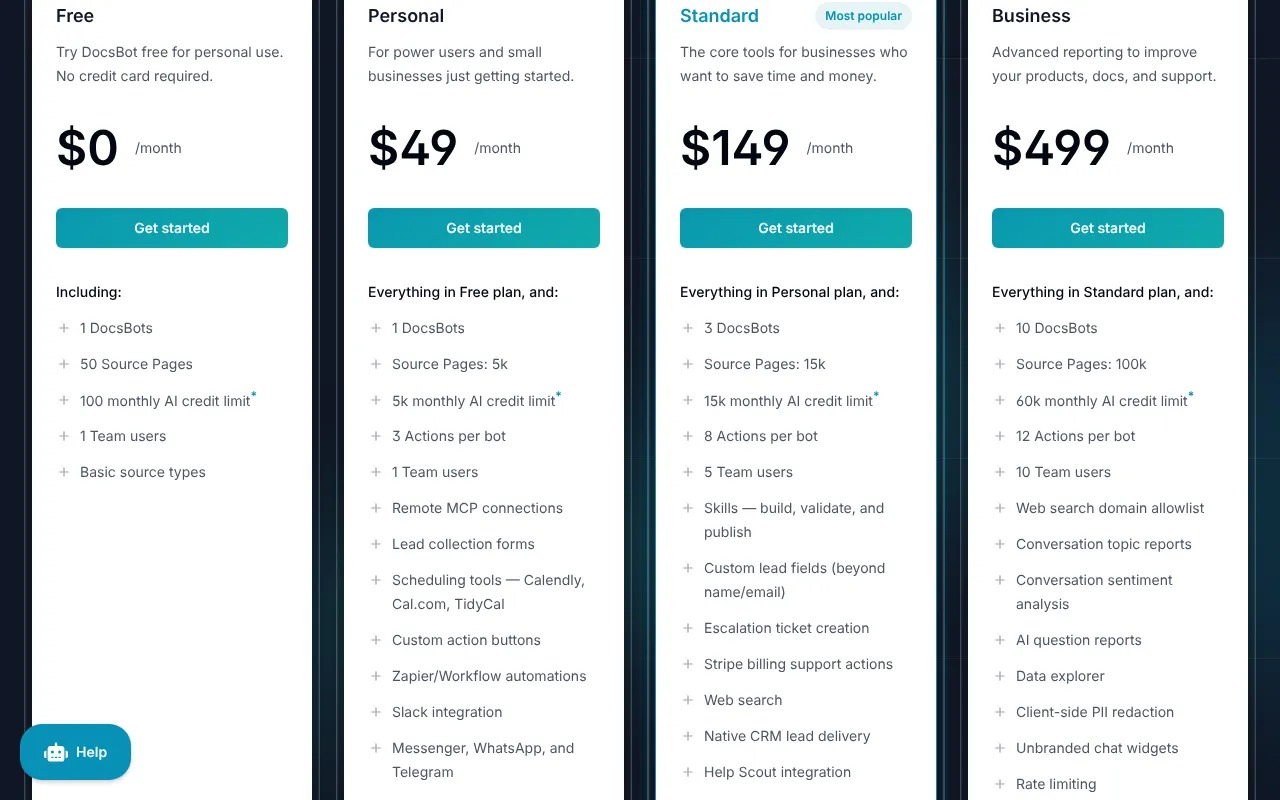
Personal, if 1 person builds the bot and it only has to answer from your content in the widget, Slack or WhatsApp. Pick Standard once the bot should create escalation tickets for your help desk, run Stripe billing actions or learn from past tickets, or once up to 5 people need to edit it.
Is DocsBot cheaper paid yearly?
Yes, by 2 months on the plan: Personal drops to $41 a month, Standard to $124 and Business to $416, paid up front as $492, $1,488 or $4,992. Add-ons on a yearly plan are charged for 12 months at their monthly price.
Does a bigger AI model cost more on DocsBot?
Yes, in credits. Each model carries a multiplier: 1 message on a 1x model uses 1 credit, while others use 3, 5, 10 or 50. If you connect your own OpenAI key, every model counts as 1 credit a message, and OpenAI bills you for the model use directly.
Can I try a paid DocsBot plan first?
Eligible businesses can ask for a Standard trial with every feature. DocsBot’s terms say a trial takes your payment details and charges you when it ends, with no reminder, so cancel before then if you don’t want to stay. Otherwise the Free plan needs no card, and paid plans come with a 14-day money-back guarantee.
Can I get a refund from DocsBot?
Within 14 days of signing up, yes, once per person or business, by email. Claiming it ends paid access and deletes your data. After that, refunds are at support’s discretion with a 5% fee, and a scheduled payment older than 30 days isn’t refunded unless DocsBot made a billing error.
Can I switch DocsBot plans whenever I like?
Yes, from the dashboard. Upgrades and downgrades apply at once, and what you didn’t use is credited to your next invoice. A cancelled plan keeps working until the period you paid for ends, and DocsBot gives at least 90 days’ notice before it changes prices.