Start free

Helpwise pricing explained

By , founder of Rinhelp · Facts checked

The short answer

Helpwise charges by the user, with a minimum head count on each of its 3 plans, and bills its AI separately: drafts and summaries spend prepaid credits that you top up in the billing settings. Premium is the first plan that lists AI Assist, so a team of 5 there pays at least $115 a month on annual billing, plus whatever credits the team burns through. Rinhelp costs that same team $49 a month, with 5,000 AI replies included.

See Rinhelp on your own site. Enter your website and Rin builds your help desk from it: a chat widget, a help center and an inbox.

Free. No sign-up to look. Ready in a minute or two.

Is your help center somewhere else?

Rin will read . If your help articles or docs live at another address, like help. or a Notion page, Rin can read those too.

Where is your help center?

Rin reads it along with and turns it into your help center.

Helpwise pricing at a glance

Cheapest plan with AI
Premium
How it bills
Per user, plus AI credits
Free plan
No, 7-day trial
AI answers cost
AI drafts only, 3 credits a reply, with 5,000 credits for $10

Helpwise plans

Standard

Billed yearly
$12 a user a month, for 2 to 10 users
Billed monthly
$15 a user a month, for 2 to 10 users
  • 3 shared inboxes
  • 15 saved replies
  • Help center or knowledge base
  • Email, live chat and Facebook
  • 1 personal email inbox per user
  • Standard analytics and integrations
  • Collaboration features

Watch out for

  • You buy at least 2 seats, and the plan stops at 10 users, so a growing team is pushed to Premium.
  • Automation is capped at 3 rules, saved replies at 15, and you get a single help center.
  • SMS, WhatsApp, API access and ecommerce integrations are all marked as Premium and up in the comparison table.
  • AI Assist and Summarize first appears on the Premium list, not this one.

Premium

Billed yearly
$23 a user a month, from 2 users
Billed monthly
$29 a user a month, from 2 users
  • Everything in Standard
  • 10 shared inboxes
  • Unlimited saved replies
  • 25 automation rules
  • All channels
  • CSAT
  • AI Assist and Summarize

Watch out for

  • The card lists a chatbot, yet the comparison table marks Chat Bot as an add-on for this plan, priced at $8 a user a month on annual billing or $10 monthly.
  • Automation tops out at 25 rules, and SLA rules and custom views wait for Advanced.
  • The 10 shared inboxes fill fast for teams with many addresses; more come in sets of 3 for $42 a month, paid yearly.
  • AI replies and summaries run on credits bought in the billing section: an AI reply spends 3 and a summary 2.

Advanced

Billed yearly
$39 a user a month, from 3 users
Billed monthly
$49 a user a month, from 3 users
  • Everything in Premium
  • 30 shared inboxes
  • Unlimited automation rules
  • SLA rules
  • Free chatbot and calling
  • AI auto prioritization
  • Priority support

Watch out for

  • You pay for at least 3 users, one more than the other plans ask, so a pair can’t buy it.
  • The card names single sign-on, while the comparison table lists SSO/SAML as an add-on with no price shown, so ask before you count on it.
  • Nothing on the pricing page puts AI credits inside the plan, so drafts written by AI are still bought on top.
  • Past 30 shared inboxes, extra inboxes are sold in sets of 3.
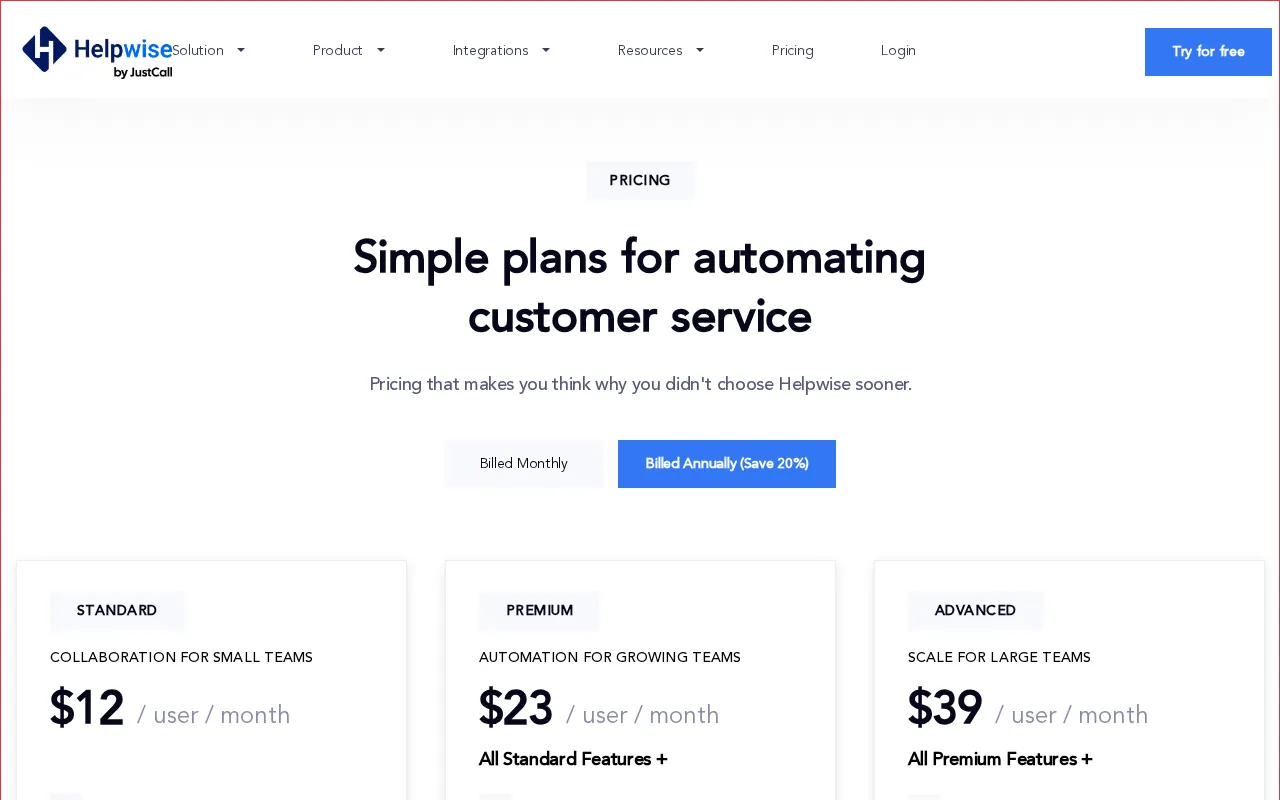
Helpwise pricing page, 11 November 2026
Helpwise’s pricing page, taken

What a team of 3, 5 or 10 pays

List prices in US dollars a month, on the cheapest plan that covers each team, counting each AI reply as one resolved conversation.

TeamMonthly billHow it adds up
3 people, 300 AI replies$69 or more3 Premium users at $23 on annual billing, plus prepaid credits for AI drafts, not counted here. No AI answers customers.
5 people, 1,000 AI replies$115 or more5 Premium users at $23 plus AI draft credits, with no AI answering customers.
10 people, 3,000 AI replies$230 or more10 Premium users at $23 plus AI draft credits, with no AI answering customers.

Costs beyond the headline price

  • AI credits: composing an email with AI spends 1 credit, a conversation summary 2 and an AI reply 3. You buy them as a one-time purchase or by autopay, from $5 a purchase, and the help article’s example buys 5,000 credits for $10.
  • The chatbot add-on runs $8 per user each month when paid yearly, or $10 month to month.
  • A set of 3 extra inboxes is $42 a month on yearly billing and $49 on monthly billing.
  • The cloud phone system is billed per active user: $4 a month paid yearly, $5 paid monthly.
  • Monthly billing costs about a quarter more than the yearly price the page shows by default: $15 against $12 on Standard, $29 against $23 on Premium and $49 against $39 on Advanced.
  • An add-on or inbox added part way through a billing cycle is charged at once for the rest of that cycle; removing one lowers only the next cycle’s bill.
  • Prices exclude sales tax and VAT, and a late payment can draw interest of 1.5% a month.
  • Helpwise refunds nothing, not for unused time nor for a cancelled annual plan, and closing early leaves the unpaid rest of the term due.

When Helpwise is worth paying for

Helpwise earns its seat price for a small team that answers customers on email, Facebook, SMS, WhatsApp and the phone, and wants every one of those threads in a single inbox at a modest seat price. Advanced makes most sense once you would buy the chatbot and phone add-ons anyway, because it bundles both. A team that only answers email and chat ends up paying for channels it never opens, and for credits on every AI draft.

Helpwise vs Rinhelp

TeamHelpwiseRinhelp
3 people, 300 AI replies$69 or more$49: Pro for the whole workspace, using 300 of its 5,000 AI replies; Free covers your team if you don’t need AI replies.
5 people, 1,000 AI replies$115 or more$49: Pro for the whole workspace, using 1,000 of its 5,000 AI replies.
10 people, 3,000 AI replies$230 or more$49: Pro for the whole workspace, using 3,000 of its 5,000 AI replies.

Helpwise pricing questions

Which Helpwise plan fits a team of 2 to 5?

Standard, if email, live chat and Facebook cover your customers and 3 rules are enough automation. Choose Premium once you need WhatsApp, SMS, the API, ecommerce integrations or AI drafting, since Standard has none of those.

How much do I save by paying Helpwise yearly?

The page puts it at 20%. A Premium seat drops from $29 to $23 and an Advanced seat from $49 to $39. Add-ons are cheaper yearly too, but the whole year is paid up front and none of it comes back if you leave early.

How do Helpwise AI credits get charged?

You top up a credit balance from the billing section, starting at $5, or set autopay to refill it when it falls below a level you pick. Each AI reply takes 3 credits, a summary 2 and a composed email 1.

Do I need a card to try Helpwise?

No. Every plan comes with a 7-day trial, and Helpwise says no credit card is needed to start. If you don’t pick a paid plan when it ends, your data is kept for 7 days before it can be deleted.

Can I get money back if I cancel Helpwise?

No. The terms call every subscription charge non-refundable. Cancelling a yearly plan only stops it renewing, and to close the account you write to help@helpwise.io or ask live support.
Sources

We checked every source below on 11 November 2026.

Try Rinhelp next to Helpwise.

Start free with up to 3 teammates and 50 AI replies. Keep Helpwise running until you’re sure.

Start free