Missive pricing questions
Should a small team pick Missive Starter or Productive?
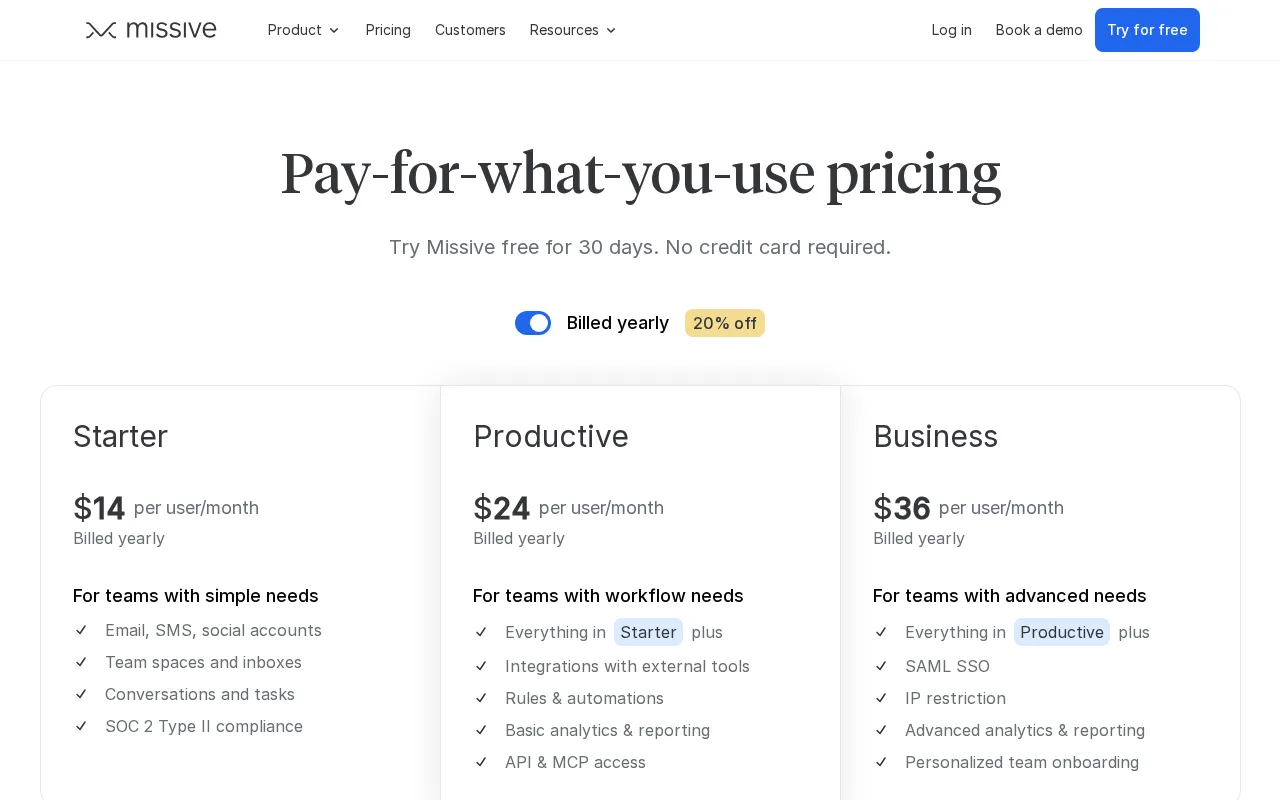
Starter suits up to 5 people who share email, chat about messages and assign tasks, with no automation. Pick Productive when you want rules, integrations, analytics or any AI at all, since Starter includes none of them.
Can I move from monthly to yearly Missive billing later?
Yes. The owner switches from “Settings” → “Billing” at any time and the 20% discount starts at once, though months already paid at the monthly rate aren’t credited. Going back is harder: you cancel the yearly plan and subscribe monthly on the day it ends.
What happens to a yearly Missive bill when the team changes size?
A new person is charged for the rest of the year on the next monthly invoice for added users. Someone who leaves is still paid for until renewal, so to swap people, remove the leaver first and the seat passes to the newcomer.
Can I change Missive plans in the middle of a year?
Upwards, yes: an upgrade from Starter to Productive or Productive to Business applies right away, with a prorated charge for the rest of the cycle. Downgrades wait until your yearly renewal.
When do extra shared accounts start to cost money in Missive?
Only once the organization passes 5 shared accounts per user. A team of 10 can connect 50 before the first $15 block of 5 is charged, on the next invoice rather than the day you connect it.
Which payment methods does Missive accept?
Visa, Mastercard, American Express, Discover and JCB cards, but not PayPal. You can add a VAT number in the billing settings, and tax-exempt organizations in the states where Missive collects sales tax can send their certificate to have it removed.