Start free

Salesforce Service Cloud pricing explained

By , founder of Rinhelp · Facts checked

The short answer

Salesforce charges for Service Cloud by the user each month, and its three service editions, Core, Advanced and Max, are paid for a year at a time at $195, $395 and $550 a user a month. Its help agent, the AI that answers customers, adds $2 for every issue it resolves on its own, so 5 people on Core whose help agent resolves 1,000 conversations pay about $2,975 a month, more than two thirds of it for resolutions. Rinhelp costs that same team $49 a month, with 5,000 AI replies included.

See Rinhelp on your own site. Enter your website and Rin builds your help desk from it: a chat widget, a help center and an inbox.

Free. No sign-up to look. Ready in a minute or two.

Is your help center somewhere else?

Rin will read . If your help articles or docs live at another address, like help. or a Notion page, Rin can read those too.

Where is your help center?

Rin reads it along with and turns it into your help center.

Salesforce Service Cloud pricing at a glance

Cheapest plan with AI
Core, plus help agent resolutions
How it bills
Per user on annual billing, plus each AI resolution
Free plan
No, free trial
AI answers cost
$2 per help agent resolution

Salesforce Service Cloud plans

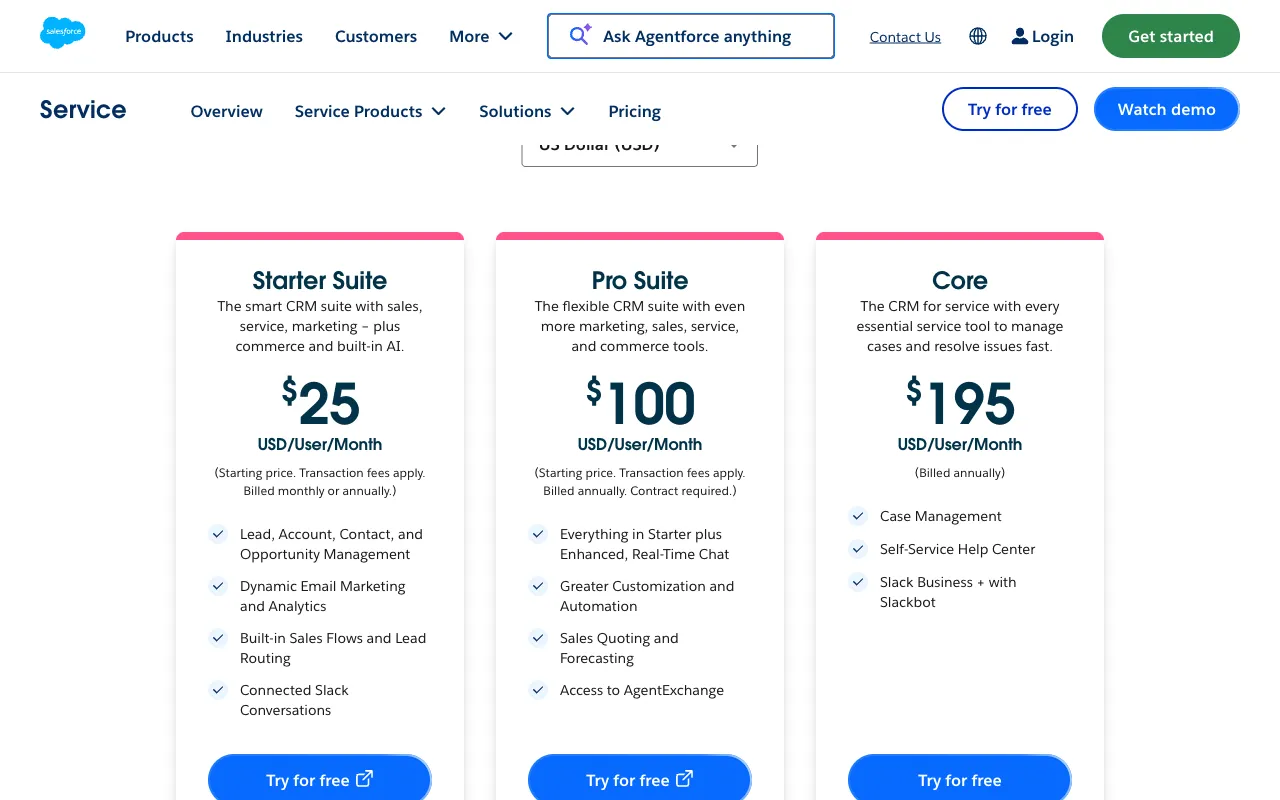
Starter Suite

Billed yearly
From $25 a user a month, plus transaction fees
Billed monthly
From $25 a user a month, plus transaction fees
  • Lead, account, contact and opportunity management
  • Dynamic email marketing and analytics
  • Built-in sales flows and lead routing
  • Connected Slack conversations
  • Case management and the Service Console
  • Knowledge management

Watch out for

  • It has no help center, Omni-Channel Routing or service contracts, and the help agent isn’t sold for it.
  • There is no Web Services API. Pro Suite sells it for $25 more a user a month, and Core is the first plan that includes it.
  • Transaction fees come on top of the $25 a user each month.

Pro Suite

Billed yearly
From $100 a user a month, plus transaction fees
Billed monthly
Not offered: billed annually, on a contract
  • Everything in Starter Suite
  • Enhanced, real-time chat
  • Greater customization and automation
  • Sales quoting and forecasting
  • Access to AgentExchange
  • Omni-Channel Routing
  • Service contracts and entitlements

Watch out for

  • It needs a contract and is billed annually, so you commit to each user for the term.
  • The Web Services API is $25 more a user each month.
  • Flow Builder stops at 5 flows for the whole org.
  • Customers still get no self-service help center, and the help agent isn’t available.

Core

Billed yearly
$195 a user a month
Billed monthly
Not offered: billed annually
  • Case management
  • Self-service help center
  • Slack Business+ with Slackbot
  • Premier Success
  • Web Services API
  • 500,000 Flex Credits per org

Watch out for

  • Help agent resolutions are bought separately, at $2 each.
  • Digital channels are sold separately, and Enhanced Messaging is $75 more a user a month.
  • Its AI for reps, Agentforce for Service, is another $125 a user a month.

Advanced

Billed yearly
$395 a user a month
Billed monthly
Not offered: billed annually
  • Everything in Core
  • AI agent for customer service
  • Web chat
  • Full sandbox
  • Backup & Recover, Data Detect and Security Center
  • 1 million Flex Credits per org

Watch out for

  • Web chat is the only digital channel included. Enhanced Messaging stays $75 a user extra.
  • Contact center seats at $125 a user and Workforce Management are still sold on top.
  • Agentforce for Service is not part of it, so reps’ AI costs $125 more a user.
  • The help agent comes with it, but every issue it resolves still costs $2.

Max

Billed yearly
$550 a user a month, through sales
Billed monthly
Not offered: billed annually
  • Everything in Advanced
  • Agentforce for Service and unmetered Agentforce Coworker
  • Digital channels and partner contact center
  • Workforce and quality management
  • 10 IT Service Desk licenses per org
  • Tableau Next and Slack Enterprise+
  • 2.75 million Flex Credits per org per year

Watch out for

  • Service Cloud’s own contact center is still an extra purchase, and native voice is a separate add-on for Max.
  • Past its 2.75 million yearly Flex Credits, AI actions bill at your contracted rate each month, and credits left over at the end of the term are lost.

What a team of 3, 5 or 10 pays

List prices in US dollars a month, on the cheapest plan that covers each team, counting each AI reply as one resolved conversation.

TeamMonthly billHow it adds up
3 people, 300 AI replies$1,1853 Core users at $195 on annual billing, plus 300 help agent resolutions at $2.
5 people, 1,000 AI replies$2,9755 Core users at $195, plus 1,000 help agent resolutions at $2.
10 people, 3,000 AI replies$7,95010 Core users at $195, plus 3,000 help agent resolutions at $2.

Costs beyond the headline price

  • Help agent resolutions: $2 each, charged only when the agent solves an issue alone. A customer who asks for a person or leaves negative feedback costs nothing.
  • Agentforce for Service, the AI that helps reps answer customers, is $125 a user a month on Core and Advanced.
  • Flex Credits, the other way to pay for Agentforce, are $500 per 100,000. A standard action uses 20 credits and a voice action 30, and an org can’t run Flex Credits and per-conversation pricing side by side.
  • Channels are sold by the user: Enhanced Messaging $75, a contact center seat $125, and voice through a partner telephony provider from $50.
  • Only Starter Suite can be paid month to month. Every other plan is billed yearly, and most Salesforce products sit on annual contracts.
  • Starter Suite and Pro Suite carry transaction fees on top of the seat price.

When Salesforce Service Cloud is worth paying for

Service Cloud earns its price at a company that already keeps sales, accounts and orders in Salesforce, so a rep sees the whole customer in every conversation and admins can bend the platform to any process. It suits large contact centers too, with routing, workforce planning, quality reviews and voice on the same records. A team of 2 to 10 answering email and chat pays for a full CRM, sandboxes and a success plan whether it uses them or not, before any AI is switched on.

Salesforce Service Cloud vs Rinhelp

TeamSalesforce Service CloudRinhelp
3 people, 300 AI replies$1,185$49: Pro for the whole workspace, using 300 of its 5,000 AI replies; Free covers your team if you don’t need AI replies.
5 people, 1,000 AI replies$2,975$49: Pro for the whole workspace, using 1,000 of its 5,000 AI replies.
10 people, 3,000 AI replies$7,950$49: Pro for the whole workspace, using 3,000 of its 5,000 AI replies.

Salesforce Service Cloud pricing questions

Which Service Cloud plan should a small support team pick?

Core is the lowest plan with a self-service help center and the option to add the help agent. Starter Suite and Pro Suite cost less but bundle sales and marketing tools, and neither offers the help agent.

Can I pay for Service Cloud monthly?

Only on Starter Suite, which Salesforce bills monthly or annually. Pro Suite needs an annual contract, and Core, Advanced and Max are billed annually.

When does Salesforce charge for a help agent resolution?

Only when the help agent resolves an issue from start to finish by itself. If the customer asks for a person or gives negative feedback, there is no charge, and the conversation goes to your team with its context.

Is there a Service Cloud free trial?

Yes: every plan but Max has a “Try for free” button, and Salesforce gives 30 days with no credit card and nothing to install.

Can I change Service Cloud plans later?

Salesforce says you can upgrade or add products at any time, though some products may need to scale together. Flex Credits you don’t use by the end of a subscription term don’t carry into the next one.
Sources

We checked every source below on 12 November 2026.

Try Rinhelp next to Salesforce Service Cloud.

Start free with up to 3 teammates and 50 AI replies. Keep Salesforce Service Cloud running until you’re sure.

Start free