Start free

tawk.to pricing explained

By , founder of Rinhelp · Facts checked

The short answer

tawk.to charges nothing for its help desk: live chat, ticketing and the knowledge base are free for any number of agents, and the company earns from add-ons billed per property, such as AI Assist and Whitelabel. AI Assist sells AI replies as monthly credits, so a team of 5 whose AI sends 1,000 replies needs the Business plan, $990 a year, or $82.50 a month. Rinhelp costs that same team $49 a month, with 5,000 AI replies included.

See Rinhelp on your own site. Enter your website and Rin builds your help desk from it: a chat widget, a help center and an inbox.

Free. No sign-up to look. Ready in a minute or two.

Is your help center somewhere else?

Rin will read . If your help articles or docs live at another address, like help. or a Notion page, Rin can read those too.

Where is your help center?

Rin reads it along with and turns it into your help center.

tawk.to pricing at a glance

Cheapest plan with AI
Free, with AI Assist
How it bills
Free, plus add-ons per website
Free plan
Yes: unlimited agents and chats, about 33 AI replies a month
AI answers cost
3 credits a reply on Auto; 100 free a month, then from $29 a month for 1,000

tawk.to plans

Free

Billed yearly
$0
Billed monthly
$0 for the whole platform, no credit card
  • Every channel and feature
  • Live chat
  • Omnichannel inbox
  • Chat pages
  • Knowledge base
  • CRM and pipeline
  • A forever-free AI Assist tier for limited volume

Watch out for

  • The “Powered by tawk.to” badge stays on your widget, chat page and knowledge base until you buy Whitelabel for that property.
  • The free AI tier, called Hobby, holds 100 message credits a month. The default Auto model spends 3 on every reply, which leaves room for about 33.
  • Hobby can’t be topped up: extra credits are sold only alongside a paid AI Assist plan.
  • Hobby runs 1 AI chat agent and crawls at most 100 pages of your website.

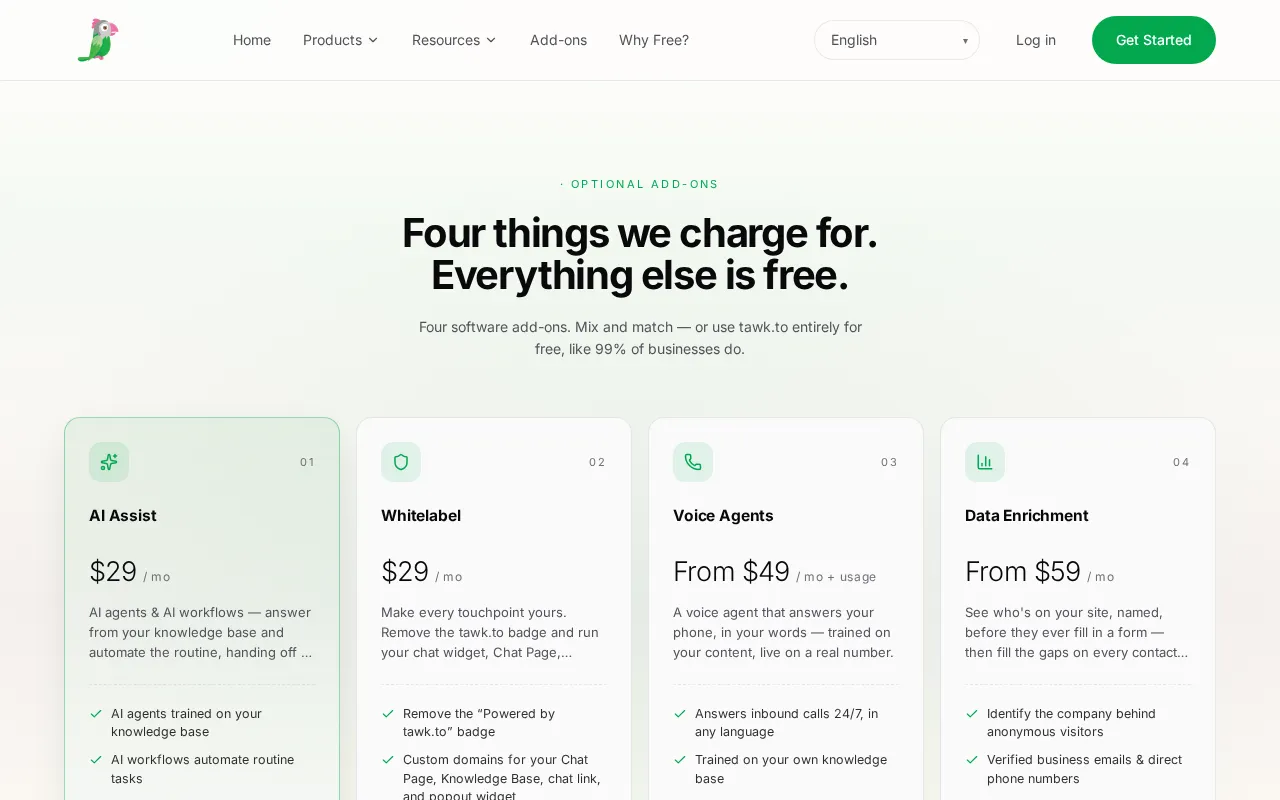
AI Assist

Billed yearly
$290, $990 or $3,990 a year per property for Growth, Business or Enterprise
Billed monthly
From $29 a month per property: $29, $99 or $399 for Growth, Business or Enterprise
  • AI agents trained on your knowledge base
  • AI workflows that automate routine tasks
  • Hand-off to your team with the full context
  • Answers that update when you update an article
  • 1,000, 5,000 or 20,000 message credits a month on Growth, Business or Enterprise
  • 3, 5 or 10 AI chat agents on Growth, Business or Enterprise

Watch out for

  • Each subscription covers one property, so a second website needs a plan of its own.
  • When the credits are gone, AI Assist finishes the conversations it is already in but joins no new ones until you top up or the month resets.
  • Credits go faster on dearer models: Auto takes 3 a reply, and some advanced models take 10 or more.

Whitelabel

Billed yearly
$348 a year per property in the help center, the same $29 a month
Billed monthly
$29 a month per property on the add-ons page, or $39 billed monthly in the help center
  • Remove the “Powered by tawk.to” badge
  • Custom domains for your chat page, knowledge base, chat link and popout widget
  • Branded ticketing emails from your own address
  • Chat transcripts sent from your own support address

Watch out for

  • The add-ons page shows $29 a month, which the help center gives as the yearly price of $348. Paid month to month it is $39.
  • It works on one property. Every other website you run pays for it again.
  • Custom domains need CNAME or TXT records added in your DNS, and HTTPS is left to you, through Cloudflare or your host.

Voice agents

Billed yearly
No yearly price listed
Billed monthly
From $49 a month, plus usage
  • Answers inbound calls 24/7, in any language
  • Makes outbound calls too
  • Trained on your own knowledge base
  • Warm transfer to a human
  • Live on your own phone number
  • A free tier to build and test

Watch out for

  • You can’t buy it yet: the add-ons page offers a waitlist.
  • The usage charged on top of the $49 starting price isn’t listed.

Data Enrichment

Billed yearly
No yearly price listed
Billed monthly
From $59 a month per property
  • Identifies the company behind anonymous visitors
  • Verified business emails and direct phone numbers
  • Company size, industry and funding on each contact
  • Intent signals from the pages visitors read
  • Synced to your CRM contacts

Watch out for

  • It is waitlist only for now.
  • The $59 is a floor: billing is per property and grows with volume, at rates the page doesn’t give.
tawk.to pricing page, 11 November 2026
tawk.to’s pricing page, taken

What a team of 3, 5 or 10 pays

List prices in US dollars a month, on the cheapest plan that covers each team, counting each AI reply as one resolved conversation.

TeamMonthly billHow it adds up
3 people, 300 AI replies$24AI Assist Growth at $290 a year, whose 1,000 monthly credits cover 300 replies at 3 credits each on the Auto model. Seats are free.
5 people, 1,000 AI replies$83AI Assist Business at $990 a year, whose 5,000 monthly credits cover 1,000 replies at 3 credits each.
10 people, 3,000 AI replies$203AI Assist Business at $990 a year plus 4,000 extra credits at $30 per 1,000, for 3,000 replies at 3 credits each.

Costs beyond the headline price

  • Extra AI credits cost $30 per 1,000, bought in blocks of 1,000 on a paid AI Assist plan. They roll over, and auto top-up can buy more whenever your balance drops below a level you set.
  • Model choice moves the bill: Auto uses 3 credits a reply, Claude Haiku 4.5, GPT-4o mini and Gemini Flash use 1, and advanced models up to 10 or more. Transcribing a voice message adds 1 credit per started minute, at most 5.
  • Every add-on is bought per property, so three websites on AI Assist Growth are three subscriptions.
  • Yearly AI Assist billing includes 2 free months: Growth is $290 a year instead of 12 payments of $29.
  • Hired chat agents, trained people who answer your chats for you, start at $1 an hour for coverage around the clock, billed month to month.
  • Subscriptions are paid up front. Cancel and the add-on stays on until the cycle ends, and a yearly plan can’t be paused.

When tawk.to is worth paying for

tawk.to earns its place when you want website chat, tickets and a help center for many teammates across several websites and are glad to answer most chats yourselves: none of that costs anything. AI Assist Growth is built for professional websites that aren’t business-critical, where a few hundred AI replies a month is enough. A team that wants the AI to answer most conversations, or to cover many websites, pays for AI Assist on each one.

tawk.to vs Rinhelp

Teamtawk.toRinhelp
3 people, 300 AI replies$24$49: Pro for the whole workspace, using 300 of its 5,000 AI replies; Free covers your team if you don’t need AI replies.
5 people, 1,000 AI replies$83$49: Pro for the whole workspace, using 1,000 of its 5,000 AI replies.
10 people, 3,000 AI replies$203$49: Pro for the whole workspace, using 3,000 of its 5,000 AI replies.

tawk.to pricing questions

Do I have to pay tawk.to to use live chat?

No. The desktop and mobile apps are free, with no cap on teammates, concurrent chats or the websites you add the widget to. You pay only for an add-on you switch on.

Which AI Assist plan should a small team pick?

Test on Hobby, which is free. On the default Auto model, Growth’s 1,000 credits cover about 333 replies and Business’s 5,000 about 1,667. Switching to a 1-credit model such as Claude Haiku 4.5 stretches each plan 3 times as far.

Is AI Assist cheaper billed yearly or monthly?

Yearly, by 2 months: $290 instead of $29 a month, $990 instead of $99 and $3,990 instead of $399. A yearly plan can’t be paused, and a move to monthly billing waits until the year ends.

What happens when AI Assist runs out of credits?

It keeps replying in conversations it has joined and stays out of new ones. Buy more at $30 per 1,000 or turn on auto top-up. Anything you used beyond your balance comes off your next credits.

How do I cancel a tawk.to add-on?

An admin opens “Administration”, then “Purchases and Invoices”, and clicks “Cancel subscription” under the plan. Each subscription is canceled on its own, and you keep the paid features until the current cycle ends.

How can I pay tawk.to?

By credit card or PayPal, charged on your billing date. Invoices can be downloaded from “Purchases and Invoices”.
Sources

We checked every source below on 11 November 2026.

Try Rinhelp next to tawk.to.

Start free with up to 3 teammates and 50 AI replies. Keep tawk.to running until you’re sure.

Start free