Start free

Yuma AI pricing explained

By , founder of Rinhelp · Facts checked

The short answer

Yuma AI charges for outcomes rather than people: each ticket it closes with nobody stepping in counts as a full resolution, and its pricing page lists yearly bundles paid upfront. Starter, the smallest of them, is $14,400 for 12,000 resolutions, so a team of 5 whose AI resolves 1,000 conversations a month spends $1,200 or more each month on Yuma, which works inside the help desk you already use. Rinhelp would bill that same team $49 a month, 5,000 AI replies included.

See Rinhelp on your own site. Enter your website and Rin builds your help desk from it: a chat widget, a help center and an inbox.

Free. No sign-up to look. Ready in a minute or two.

Is your help center somewhere else?

Rin will read . If your help articles or docs live at another address, like help. or a Notion page, Rin can read those too.

Where is your help center?

Rin reads it along with and turns it into your help center.

Yuma AI pricing at a glance

Cheapest plan with AI
Starter, paid yearly
How it bills
Per full resolution, on a 12-month commitment
Free plan
No, a free 30-day trial on your live tickets
AI answers cost
About $1.20 per full resolution on Starter, down to $0.55 at volume

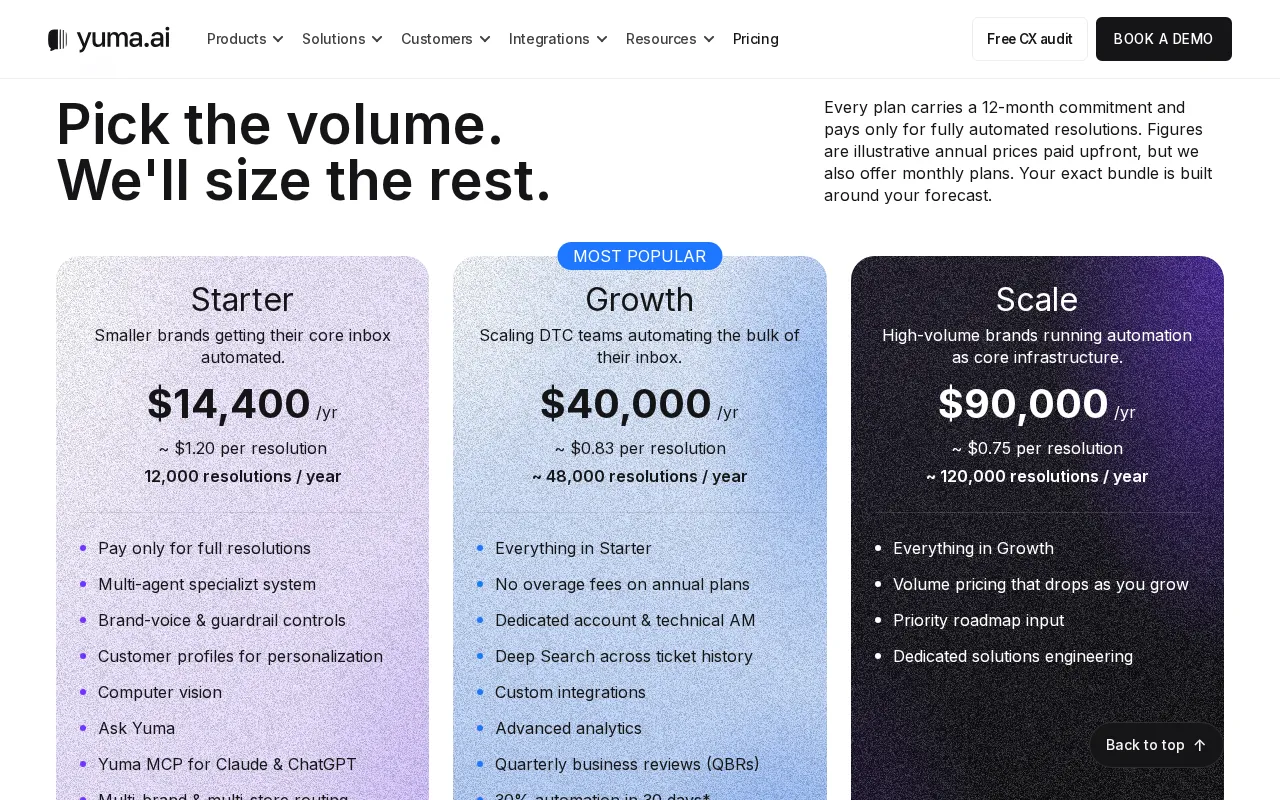
Yuma AI plans

Starter

Billed yearly
$14,400 a year paid upfront for 12,000 full resolutions, about $1.20 each
Billed monthly
Quote only
  • Pay only for full resolutions
  • Brand-voice & guardrail controls
  • Customer profiles for personalization
  • Computer vision
  • Ask Yuma
  • Yuma MCP for Claude & ChatGPT
  • Multi-brand & multi-store routing

Watch out for

  • Its 12,000 resolutions work out to 1,000 a month. On the annual plan, Yuma goes quiet once they are used and picks up again at renewal; on a monthly plan, each one past the quota is $1.50.
  • Deep Search across ticket history, advanced analytics and quarterly business reviews are listed from Growth up, not here.

Growth

Billed yearly
$40,000 a year paid upfront for about 48,000 full resolutions, about $0.83 each
Billed monthly
Quote only
  • Everything in Starter
  • No overage fees on annual plans
  • Dedicated account & technical AM
  • Deep Search across ticket history
  • Custom integrations
  • Advanced analytics
  • Quarterly business reviews (QBRs)

Watch out for

  • The “30% automation in 30 days” promise carries an asterisk: it depends on your internal processes and how fast Yuma can connect and ramp up, with the timeline agreed at onboarding.
  • Its roughly 48,000 resolutions are a hard ceiling on the annual plan: there are no overage fees, so once they are spent Yuma pauses until renewal.

Scale

Billed yearly
$90,000 a year paid upfront for about 120,000 full resolutions, about $0.75 each
Billed monthly
Quote only
  • Everything in Growth
  • Volume pricing that drops as you grow
  • Priority roadmap input
  • Dedicated solutions engineering

Watch out for

  • On annual billing, Yuma stops resolving when the bundle of about 120,000 is used up and starts again at the next renewal.
  • Voice AI, Social AI and Sales AI stay separate add-ons, even at this size.
Yuma AI pricing page, 11 November 2026
Yuma AI’s pricing page, taken

What a team of 3, 5 or 10 pays

List prices in US dollars a month, on the cheapest plan that covers each team, counting each AI reply as one resolved conversation.

TeamMonthly billHow it adds up
3 people, 300 AI replies$1,200 or moreStarter, $14,400 a year paid upfront, or $1,200 a month, for 12,000 full resolutions a year, of which 300 a month use 3,600. Its Shopify listing starts at $850 a month without saying how many tickets that covers, and your help desk’s seats come on top.
5 people, 1,000 AI replies$1,200 or moreStarter’s 12,000 resolutions a year are exactly 1,000 a month, at $14,400 a year paid upfront, plus the help desk Yuma works in.
10 people, 3,000 AI replies$3,333 or moreGrowth, $40,000 a year paid upfront for about 48,000 resolutions, of which 3,000 a month use 36,000. The help desk bills its seats separately.

Costs beyond the headline price

  • Yuma isn’t a help desk: it works inside the one you already use, such as Gorgias, Zendesk, Kustomer or Salesforce Service Cloud, and its own price is for resolutions, never per agent or seat.
  • Past 120,000 resolutions a year the rate keeps dropping toward a $0.55 floor, but no tiers are published in between: Yuma sizes that bundle to your numbers.
  • Voice AI for phone calls, Social AI for comments and DMs, and Sales AI on your storefront are add-ons whose price depends on scope. Sales AI runs on a subscription of its own.
  • Connectors to tools outside its 100+ ready-made integrations come as a custom integrations add-on, also priced in a conversation with sales.
  • Monthly plans exist but carry no printed price, and every resolution past the monthly quota is billed at a flat $1.50. Annual plans have no overage: usage simply stops at the end of the bundle.
  • On the Shopify App Store, Yuma lists Small Merchant at $850 a month and Medium Merchant at $1,200, each a package of automated tickets with overage fees, and warns that additional support fees may apply.
  • Getting started costs nothing extra: there is no implementation fee on any plan, and the first 30 days are free.
  • Yuma’s standard online terms let it change prices with at least 30 days’ notice, taking effect in the next subscription period. A separately signed agreement replaces those terms.

When Yuma AI is worth paying for

Yuma earns its price for a brand with thousands of order-status, return and subscription tickets a month, already running Gorgias, Zendesk or Kustomer, that wants those tickets closed with real actions in Shopify, Recharge or Loop rather than drafted for a person. Only full resolutions reach the bill, so a ticket your agent steps into or one Yuma escalates is free, and adding teammates, brands or channels leaves the price unchanged. A store with a few hundred tickets a month overpays: Starter is sized for 1,000 resolutions a month, so resolving 300 puts each one at more than 3 times the listed rate.

Yuma AI vs Rinhelp

TeamYuma AIRinhelp
3 people, 300 AI replies$1,200 or more$49: Pro for the whole workspace, using 300 of its 5,000 AI replies; Free covers your team if you don’t need AI replies.
5 people, 1,000 AI replies$1,200 or more$49: Pro for the whole workspace, using 1,000 of its 5,000 AI replies.
10 people, 3,000 AI replies$3,333 or more$49: Pro for the whole workspace, using 3,000 of its 5,000 AI replies.

Yuma AI pricing questions

Which Yuma plan matches my ticket volume?

Count the tickets Yuma could close with nobody stepping in, not every ticket. Yuma says most customers automate between 40% and 89%, so 5,000 tickets a month at 40% is about 2,000 resolutions, or 24,000 a year: too many for Starter’s 12,000 and well inside Growth’s 48,000.

Should I pay Yuma yearly or monthly?

Every plan on Yuma’s pricing page is a 12-month commitment paid upfront, and that is how you get its listed rates with no overage. The page says monthly plans exist but prints no price for them, and each resolution past their quota is $1.50, more than Starter’s yearly rate of about $1.20.

Can I try Yuma before I sign?

Yes. Yuma says every contract starts with 30 free days on your live tickets, with a target automation rate agreed up front and setup done by its own team. Its 2 plans on the Shopify App Store show a 14-day free trial.

Do more teammates or stores raise the Yuma bill?

No. Yuma never charges per agent or seat, so more teammates, brands or channels leave its price where it is. Yuma itself runs inside the help desk you already use.

Can I buy Yuma without talking to sales?

Not from its pricing page: every plan there leads to “Book a demo”, and an account executive prices your volume within 1 business day. The Shopify App Store listing has an install button, with plans from $850 a month.

What if Yuma doesn’t pay for itself?

Yuma’s FAQ says every contract carries a 100% ROI guarantee, but the site doesn’t explain how it is measured or what you get back if it’s missed. Ask for those terms in writing before the free 30 days end.
Sources

We checked every source below on 11 November 2026.

Try Rinhelp next to Yuma AI.

Start free with up to 3 teammates and 50 AI replies. Keep Yuma AI running until you’re sure.

Start free