Start free

Keeping pricing explained

By , founder of Rinhelp · Facts checked

The short answer

Keeping charges for each person who works the shared inbox, never fewer than 2, and its 3 plans differ mostly in mailbox caps, integrations and compliance, and none of them has AI that writes to customers. Essentials is the entry point at $14 per person when you pay for the year, or $19 if you go month by month, so a team of 5 pays $70 a month on yearly billing. Rinhelp costs that team $49 a month, with 5,000 AI replies included.

See Rinhelp on your own site. Enter your website and Rin builds your help desk from it: a chat widget, a help center and an inbox.

Free. No sign-up to look. Ready in a minute or two.

Is your help center somewhere else?

Rin will read . If your help articles or docs live at another address, like help. or a Notion page, Rin can read those too.

Where is your help center?

Rin reads it along with and turns it into your help center.

Keeping pricing at a glance

Cheapest plan with AI
Advanced, whose AI only spots “thank you” replies
How it bills
Per user, with a 2-user minimum
Free plan
No, 14-day trial with no card
AI answers cost
No AI answers customers; Advanced detects “thank you” replies that need no answer

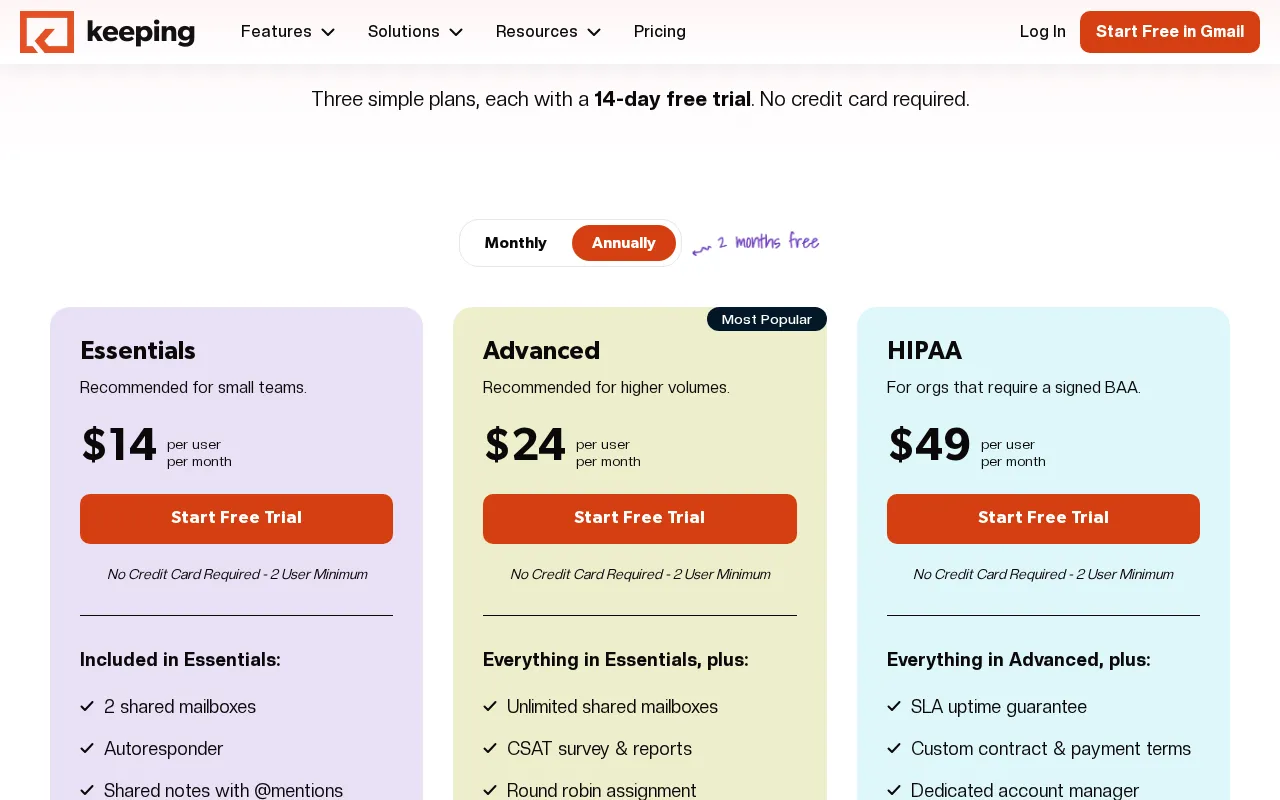
Keeping plans

Essentials

Billed yearly
$14 a user a month, 2 users at least
Billed monthly
$19 a user a month, 2 users at least
  • 2 shared mailboxes and up to 10 users
  • Shared notes with @mentions
  • Collision detection
  • Mobile and web portal
  • 2 workflows
  • Shared templates
  • Limited MCP access

Watch out for

  • Only 2 shared mailboxes and at most 10 people fit on it, so an 11th teammate or a third address such as billing@ pushes you onto Advanced.
  • You get 2 workflows for routing and tagging, and round robin assignment, SLAs, shared drafts and custom fields are missing.
  • Slack is the one integration it connects. Shopify, HubSpot, Zapier, Jira and the rest start on Advanced.
  • Reports stay basic: no CSAT surveys, no reports by tag, no busiest-times view and no CSV export. MCP access is labeled “Limited”.

Advanced

Billed yearly
$24 a user a month, 2 users at least
Billed monthly
$29 a user a month, 2 users at least
  • Everything in Essentials
  • Unlimited shared mailboxes
  • CSAT survey and reports
  • Unlimited workflows
  • Service level agreements (SLAs)
  • All integrations
  • Full MCP access

Watch out for

  • Its only built-in AI flags customer emails that need no answer, such as a “thank you”. Your own assistant can draft through the MCP server, but a person still sends every email.
  • The Shopify link reads one way: it shows a customer’s 4 latest orders, lifetime value and tracking, and orders can’t be changed from Keeping.
  • A signed BAA, an uptime SLA and a dedicated account manager are kept for the HIPAA plan, at roughly twice the seat price.

HIPAA

Billed yearly
$49 a user a month, 2 users at least
Billed monthly
$59 a user a month, 2 users at least
  • Everything in Advanced
  • Executed BAA
  • Full HIPAA compliance
  • SLA uptime guarantee
  • Custom contract and payment terms
  • Dedicated account manager

Watch out for

  • The BAA covers only an account Keeping has switched to HIPAA mode. A trial or any other plan sits outside it, so keep patient data out while you test.
  • You also need your own business associate agreement with Google for the Gmail accounts you connect, and free @gmail.com accounts can’t join.
  • Integrations and automation tools you plug in fall outside Keeping’s BAA, so each needs its own agreement where the law asks for one.
  • Downgrading, or letting the plan lapse, ends HIPAA status at once, so export patient data before you change plans.
Keeping pricing page, 11 November 2026
Keeping’s pricing page, taken

What a team of 3, 5 or 10 pays

List prices in US dollars a month, on the cheapest plan that covers each team, counting each AI reply as one resolved conversation.

TeamMonthly billHow it adds up
3 people, 300 AI replies$423 Essentials users at $14 on annual billing, with no AI answering customers.
5 people, 1,000 AI replies$705 Essentials users at $14 on annual billing, with no AI answering customers.
10 people, 3,000 AI replies$14010 Essentials users at $14 on annual billing, Essentials’ limit, with no AI answering customers.

Costs beyond the headline price

  • Month-to-month billing raises every seat: Essentials goes from $14 to $19, Advanced from $24 to $29 and HIPAA from $49 to $59.
  • The 2-user minimum means someone handling the inbox alone still pays for 2 seats.
  • Seat changes in the middle of a period are prorated, and an admin inviting a person past your paid seats adds one to the bill on the spot.
  • Prices are in US dollars and leave out taxes.
  • Keeping’s MCP docs say a plan without “Advanced MCP” can ask Keeping to add it to the subscription, at a price the pricing page doesn’t list.
  • The only refund Keeping’s terms describe is for EU consumers who withdraw within 14 days, so ask about refunds before you prepay a year.
  • Keeping’s terms put a cancellation into effect 15 days after notice, and the account’s data is deleted 30 days after it is cancelled.

When Keeping is worth paying for

Keeping earns its price for a team on Google Workspace that answers email at support@, hr@ or it@ and mostly needs clear owners, statuses and an end to double replies, without learning a new app. Clinics and other healthcare teams that work in Gmail can keep doing so under a signed BAA on the HIPAA plan. Teams that also want live chat, a help center or AI that answers customers overpay, since no seat buys any of those, and a team that grows past 10 people has to switch plans even if Essentials’ features were enough.

Keeping vs Rinhelp

TeamKeepingRinhelp
3 people, 300 AI replies$42$49: Pro for the whole workspace, using 300 of its 5,000 AI replies; Free covers your team if you don’t need AI replies.
5 people, 1,000 AI replies$70$49: Pro for the whole workspace, using 1,000 of its 5,000 AI replies.
10 people, 3,000 AI replies$140$49: Pro for the whole workspace, using 3,000 of its 5,000 AI replies.

Keeping pricing questions

Which Keeping plan fits a small support team?

Essentials, if 1 or 2 addresses and 10 people are enough and Slack is the only tool you connect. Pick Advanced once you want Shopify or HubSpot beside each email, CSAT surveys, SLAs or more than 2 workflows.

Is Keeping cheaper paid yearly?

Yes. Paying for the year brings Essentials from $19 to $14 per person each month, Advanced from $29 to $24 and HIPAA from $59 to $49. The toggle on the pricing page shows both figures.

How does the Keeping free trial work?

Every plan starts with 14 free days and no card. Keeping’s terms say a trial ends by itself and becomes a paid plan only if you buy one. Since the BAA doesn’t cover a trial, test HIPAA with no patient data.

Can I add or remove Keeping seats mid-term?

Yes. An admin changes the number of paid seats from the “Plans & Billing” tab in Settings, and Keeping prorates the difference for the rest of the period.

Can I move from Advanced down to Essentials?

Only when your account already fits Essentials: 2 shared mailboxes, 10 users and 2 workflows. Trim the extras first, or ask Keeping’s support to help with the switch.

What happens when I cancel Keeping?

The account’s billing admin cancels from “Plans & Billing”, or pauses the subscription instead to hold on to the data. Once an account is cancelled, Keeping deletes its data after 30 days.
Sources

We checked every source below on 11 November 2026.

Try Rinhelp next to Keeping.

Start free with up to 3 teammates and 50 AI replies. Keep Keeping running until you’re sure.

Start free