
Start free

Kommo vs Respond.io (2026): pricing, AI and features

By , founder of Rinhelp, which appears in this comparison · Facts checked

The short answer

Kommo suits a sales team that closes deals in WhatsApp, Instagram and TikTok and wants every chat filed as a lead in a pipeline, paying per seat on a term of 6 months or longer. Respond.io suits a B2C team that sells and supports across WhatsApp, LINE, WeChat, Viber and other messaging apps and wants calls in the same inbox. Respond.io Starter has no contact limit, Growth and Advanced are sized by how many contacts you talk to each month, and all three can be paid month to month. For 5 people with 1,000 AI replies a month, Kommo Advanced comes to $145.85 or more a month on a 1-year subscription, since Kommo publishes no credit cost per reply against the team’s 6,250 pooled credits. Respond.io Growth is $159 a month billed yearly for 10 users and 1,000 monthly active contacts, and its 10,000 AI credits cover those replies at 2 to 5 credits each.

See Rinhelp on your own site. Enter your website and Rin builds your help desk from it: a chat widget, a help center and an inbox.

Free. No sign-up to look. Ready in a minute or two.

Is your help center somewhere else?

Rin will read . If your help articles or docs live at another address, like help. or a Notion page, Rin can read those too.

Where is your help center?

Rin reads it along with and turns it into your help center.

Kommo vs Respond.io at a glance

ToolBest forHow it billsFree plan3 people, 300 AI replies
KommoSales teams that sell over WhatsApp and social messengers and want each chat tracked as a lead through a pipeline.Per user, on subscriptions of 6 months or more, plus shared AI creditsNo, 14-day trial of every Pro feature without a card$88 or more
Respond.ioB2C teams that sell and support over WhatsApp and other messaging apps, and want AI agents and calls in the same inbox.Per plan, priced by the contacts you talk to each month, with users and AI credits includedNo, 7-day trial of Growth without a card$159
RinhelpSmall teams that want AI on every conversation at one flat price, and want their own AI agents working in the inbox.One price per workspaceYes: 3 teammates, 50 AI replies to try Rin$49

Key differences

Kommo bills each person, Respond.io Growth each contact tier

On Kommo, every teammate is a seat: Advanced runs $29.17 a user a month on a 1-year subscription, so doubling the team doubles the bill. Respond.io Growth already includes 10 users and grows with the monthly active contacts you talk to instead, from $159 for 1,000 to $239 for 2,500, $319 for 5,000 and $449 for 10,000 on yearly billing, with $12 per 100 contacts past your tier. So 10 people talking to 1,000 contacts pay $159 on Growth against $291.70 for 10 Kommo Advanced seats, while 5 people talking to 10,000 contacts pay $449 on Growth against $145.85 or more on Kommo.

Respond.io can be paid by the month, Kommo can’t

Respond.io lists Starter at $99 and Growth at $199 month to month, and yearly billing brings them down to $79 and $159. Kommo’s shortest subscription is 6 months, $35 a user a month on Advanced, $210 a user in all, and since September 1, 2026 a new customer’s Base and Advanced prices depend on the billing country. Neither promises a refund for time you don’t use.

Kommo’s AI agents qualify leads, Respond.io’s can also pick up the phone

Kommo’s AI agents answer from your own sources and qualify leads, with 3 active at once on Advanced and 50 on Pro, where they also book appointments and handle voice messages. Respond.io’s AI agents, from Growth, answer from your website and documents, assign or close conversations, update contact fields and hand off to your team. On Advanced they answer voice calls too, and the inbox holds WhatsApp, Messenger and VoIP calls.

A known credit cost per AI reply, or a pool with no rate

Respond.io says an AI agent reply takes 2 to 5 credits, gives Growth 10 credits for every contact in your tier and Advanced 20, and charges $15 per 1,000 past the allowance. Kommo adds 1,250 credits a month per Advanced seat to one pool that summaries, suggestions and AI agents all draw on, without saying what a reply costs. That pool expires each month, more comes in blocks of 5,000, and Kommo’s AI agents stop responding once it is empty.

Of the two, only Respond.io has an official MCP server

Respond.io hosts an MCP server on every plan, Starter included, so Claude or ChatGPT can sign in with OAuth and read history, reply, add internal notes, assign and close with your own role. Kommo offers no official MCP server, and its API reads chat history only on Pro or Enterprise.

Pricing at three sizes

What each tool costs a month in US dollars, with AI answering, and how each total adds up. Each AI reply counts as one resolved conversation.

Tool3 people, 300 AI replies5 people, 1,000 AI replies10 people, 3,000 AI replies
Kommo$88 or more3 Advanced seats at $29.17 on a 1-year subscription, the first plan with the AI agent, with 3,750 AI credits a month; Kommo doesn’t say how many credits a reply uses, so 300 AI replies may need more.$146 or more5 Advanced seats at $29.17 on a 1-year subscription, with 6,250 AI credits a month, plus any extra credits 1,000 AI replies need.$292 or more10 Advanced seats at $29.17 on a 1-year subscription, with 12,500 AI credits a month, plus any extra credits 3,000 AI replies need.
Respond.io$159Growth at $159 a month billed yearly, $1,908 a year, for 10 users and 1,000 monthly active contacts, with 10,000 AI credits; at 2 to 5 credits per AI agent reply, 300 replies use at most 1,500.$159Growth at $159 a month billed yearly, for 10 users and 1,000 monthly active contacts, with 10,000 AI credits; at 2 to 5 credits per AI agent reply, 1,000 replies use at most 5,000.$319Growth at $319 a month billed yearly on the 5,000-contact tier, since 3,000 contacts pass the 2,500 tier, for 10 users and 50,000 AI credits; 3,000 AI agent replies use at most 15,000.
Rinhelp$49Pro for the whole workspace, using 300 of its 5,000 AI replies; Free covers your team if you don’t need AI replies.$49Pro for the whole workspace, using 1,000 of its 5,000 AI replies.$49Pro for the whole workspace, using 3,000 of its 5,000 AI replies.

Features compared

A check means the vendor’s own pages say a plan includes it.

ToolEmailLive chatWhatsAppVoiceHelp centerAI that answers customersShopifyStripeFree planSignup without a sales call
Kommo
Respond.io
Rinhelp

What your AI can do in each tool

Connect Claude, ChatGPT or your own AI agent through the vendor’s official MCP server, and this is what it can do of 11 everyday actions: search and read conversations, reply to a customer, add an internal note, assign, close or reopen, search the help center, write or update an article, publish an article, create a saved reply, look up an order, refund or cancel.

ToolThrough official MCPWhat it can doMoney moves wait for a teammate
Kommo0 of 11No official MCP server, or nothing from this listNo refunds or cancellations through MCP
Respond.io5 of 11Search and read conversations, reply to a customer, add an internal note, assign, close or reopenNo refunds or cancellations through MCP
Rinhelp11 of 11Search and read conversations, reply to a customer, add an internal note, assign, close or reopen, search the help center, write or update an article, publish an article, create a saved reply, look up an order, refund or cancelYes, a teammate approves first

More on each MCP server, and connectors from other companies, which don’t count:

  • Respond.io: Respond.io’s hosted MCP server is listed on every plan, signs in with OAuth and acts with your own role in one workspace. Its tools also manage contacts, AI agents and Workflows, it asks before publishing, stopping or deleting a Workflow, and its actions use no AI credits.

Kommo

Kommo homepage, November 2026

Kommo is a messenger-based sales CRM: one inbox for WhatsApp, Instagram, Facebook, TikTok, Telegram, email and website chat, where each chat becomes a lead in a sales pipeline, with Salesbots, broadcasts and AI agents that answer and qualify leads.

Best for
Sales teams that sell over WhatsApp and social messengers and want each chat tracked as a lead through a pipeline.
How it bills
Per user a month on a 6-month subscription, the shortest Kommo sells: Base is $25, Advanced $35 and Pro $45, or $20.84, $29.17 and $37.50 on a 1-year subscription, with no monthly payment. Since September 1, 2026, Base and Advanced prices for new customers depend on their billing country. Each seat adds AI credits a month, 750 on Base, 1,250 on Advanced and 2,250 on Pro, shared by every AI feature, and more can be bought in blocks of 5,000.
Free plan
No, 14-day trial of every Pro feature without a card
3 people, 300 AI replies
$88 or more a month: 3 Advanced seats at $29.17 on a 1-year subscription, the first plan with the AI agent, with 3,750 AI credits a month; Kommo doesn’t say how many credits a reply uses, so 300 AI replies may need more.

Pros

  • WhatsApp, Instagram, Facebook, TikTok and Telegram chats, email and website chat in one inbox, next to a sales pipeline.
  • AI agents answer chats from your own sources, qualify leads and book meetings, with 3 active at once on Advanced and 50 on Pro.
  • Broadcasts, Salesbots and workflow automations start on Advanced.
  • A 14-day trial of every Pro feature without a card, and checkout by card or PayPal without a sales call.

Cons

  • No monthly payment: the shortest subscription is 6 months, and payments aren’t refunded for unused time except in special cases.
  • Every AI feature shares one pool of credits that expires each month, and AI agents stop responding when it runs out.
  • The AI agent reads Shopify data without changing it, and orders can’t be cancelled from Kommo.
  • No help center for customers and no official MCP server, and the API reads chat history only on Pro or Enterprise.

Already on Kommo? See the best Kommo alternatives.
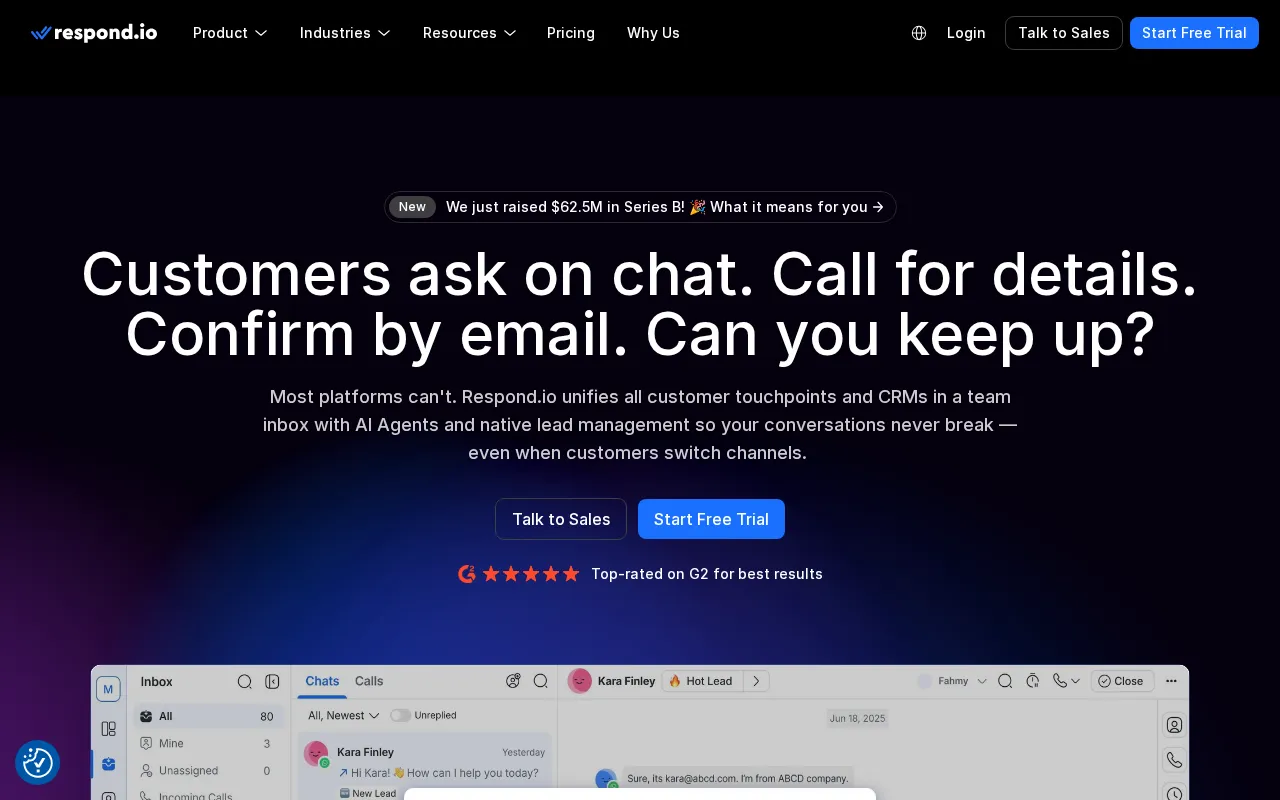
Respond.io

Respond.io homepage, November 2026

Respond.io is a WhatsApp-first conversation platform for B2C sales and support: one inbox for WhatsApp, Instagram, Messenger, TikTok, Telegram, email, website chat and calls, with AI agents that answer, qualify leads and route chats, plus broadcasts and workflows.

Best for
B2C teams that sell and support over WhatsApp and other messaging apps, and want AI agents and calls in the same inbox.
How it bills
Starter is $79 a month on yearly billing, $948 a year, or $99 month to month, for 5 users and no limit on monthly active contacts. Growth and Advanced start with 10 users and 1,000 monthly active contacts: Growth from $159 a month yearly or $199 monthly, Advanced from $279 or $349, rising with each tier of 2,500, 5,000 and 10,000 contacts. Extra users are $12, $20 and $24 a month on yearly billing, or $15, $25 and $30 monthly. Contacts past the tier cost $12 per 100 on Growth and $15 per 100 on Advanced, and AI credits past the allowance $15 per 1,000, until a month’s usage reaches twice the allowance and AI features pause until the next billing cycle. Meta bills WhatsApp fees on top.
Free plan
No, 7-day trial of Growth without a card
3 people, 300 AI replies
$159 a month: Growth at $159 a month billed yearly, $1,908 a year, for 10 users and 1,000 monthly active contacts, with 10,000 AI credits; at 2 to 5 credits per AI agent reply, 300 replies use at most 1,500.

Pros

  • WhatsApp, Instagram, Messenger, TikTok, Telegram, LINE, WeChat, Viber, SMS, email and website chat in one inbox, with WhatsApp, Messenger and VoIP calls beside them.
  • AI agents answer from your website and documents, assign or close conversations, update contact fields and hand off to your team, from Growth up.
  • An official hosted MCP server on every plan lets Claude or ChatGPT read message history, reply, add internal comments, assign and close conversations, with your own role.
  • Starter has no limit on the contacts you talk to, at $79 a month on yearly billing for 5 users.
  • A 7-day trial of Growth without a credit card, and Starter and Growth are bought without a sales call.

Cons

  • AI agents, Workflows, broadcasts and the Developer API start on Growth, so Starter has none of them.
  • Growth and Advanced are priced by monthly active contacts, so the bill climbs with each tier, and contacts past it cost $12 or $15 per 100.
  • No help center for customers, and no Shopify or Stripe integration of its own: store orders reach it only through Zapier, Make or n8n.
  • Fees aren’t refunded for unused time, and Meta bills WhatsApp’s own fees on top of the plan.

Already on Respond.io? See the best Respond.io alternatives.

Pick Kommo if

  • Every WhatsApp or Instagram chat should turn into a lead that moves through pipeline stages, with Salesbots and broadcasts chasing the follow-up.
  • Up to 5 salespeople want AI agents: 5 Kommo Advanced seats on a 1-year subscription cost $145.85, under Respond.io Growth’s $159, before any extra AI credits.
  • You want AI agents that book appointments from a booking page, with up to 50 of them on Pro.
  • You run ads and want dynamic segments synced to your ad platforms, which Pro includes.
  • You’d rather try every Pro feature for 14 days, card-free, than get 7 days of one plan.

Pick Respond.io if

  • You want to pay month to month while you learn how many contacts you really talk to, at $199 for Growth or $99 for Starter.
  • Customers call on WhatsApp, Messenger or VoIP, and those calls belong in the inbox beside the chats, with AI agents answering them on Advanced.
  • Up to 10 people share the inbox and talk to about 1,000 contacts a month, so Growth at $159 a month billed yearly covers the whole team.
  • You want Claude or ChatGPT replying, assigning and closing through an official MCP server, even on Starter.

When to consider Rinhelp instead

Rinhelp is the one to try if your small team answers support questions over email and website chat, rather than selling in messengers. Rin, our built-in AI, replies first from your website and help center, and neither Kommo nor Respond.io gives customers a help center. One Pro workspace costs $49 monthly, 5,000 AI replies included, billed month to month. Teams of 3 or fewer can use Free, with 50 AI replies to try Rin. Your own AI agent works the inbox through MCP, and refunds, cancellations and anything else that moves money or can’t be undone need a teammate’s approval first. Rinhelp has no WhatsApp, Instagram, SMS or phone, no pipeline, and no reports or routing rules. If your buyers live in WhatsApp and every chat is a deal, Kommo or Respond.io fits better. If you need AI answering phone calls, neither Rinhelp nor Kommo does that: go with Respond.io Advanced.

Start free

Moving to Rinhelp

From Kommo

Kommo conversations and their chat messages, from WhatsApp and the other chat channels connected to Kommo, come out of its API on the Pro and Enterprise plans. The API lists 250 conversations a page and reads each one’s messages with one more call. Leads, pipelines and Salesbots stay in Kommo. See the full move from Kommo.

From Respond.io

Respond.io keeps every message on the contact, across WhatsApp, email, website chat and its other channels. Its Developer API, on Growth and above, lists contacts 99 a page and each contact’s messages 50 a page, with internal comments mixed in when asked. Workflows, broadcasts and AI agents stay in Respond.io. See the full move from Respond.io.

Questions about Kommo vs Respond.io

What do the cheapest Kommo and Respond.io plans leave out?

AI agents, on both. Kommo Base, at $20.84 a user a month on 1 year, keeps the inbox, sales pipelines and AI that suggests replies and summarizes, with 2,500 leads and 750 AI credits per user, but broadcasts, no-code bots and AI agents wait for Advanced. Respond.io Starter, at $79 a month billed yearly for 5 users and any number of contacts, has AI Assist, chat summaries and the MCP server, but no AI agents, Workflows, broadcasts or Developer API.

What makes the bill go up as we grow?

On Kommo, people: each new teammate is another seat, at $29.17 a month on Advanced with a 1-year subscription. On Respond.io Growth, mostly contacts: the 11th user costs $20 a month on yearly billing, while each jump in monthly active contacts moves you to a higher tier or costs $12 per 100 past it.

What happens when the AI credits run out?

On Kommo, AI agents go quiet until the monthly allowance comes back or you buy another block of 5,000 credits. Respond.io bills the credits you use past the allowance at $15 per 1,000, and its AI stops for the rest of the billing cycle when usage reaches 200% of the allowance.

Can either one cancel a Shopify order?

Not on their own. Kommo connects to Shopify, but its AI agent reads the store’s data without changing it, and orders can’t be cancelled from Kommo. Respond.io has no Shopify integration of its own, so store orders reach it through Zapier, Make or n8n.

How we checked

We compared Kommo and Respond.io using the facts we keep on each, checked against the vendor’s own pages on the date shown beside its sources. Rinhelp is in every table because it is our product and we wrote this page, so check each figure against the vendor’s own page before you decide.

Costs are list prices in US dollars for three team sizes, on the cheapest plan that covers them, counting each AI reply as one resolved conversation. Features count only when the vendor’s own pages say a plan includes them. The AI column counts actions an official MCP server from the vendor can take, out of 11, and leaves third-party connectors out.

Try Rinhelp next to Kommo or Respond.io.

Start free with up to 3 teammates and 50 AI replies.

Start free